
Career guide
What Recruiters Look for in Job Applications — Explained
Learn what government recruiters look for in online applications. Beat ATS filters and impress hiring managers.

Navigating the modern job market, especially for government positions in India, requires more than just qualifications; it demands strategic application. This comprehensive guide will delve into the intricate world of online job applications, revealing what recruiters truly seek, from bypassing automated systems to making a lasting human impression. By understanding these critical elements, you can significantly enhance your chances of securing your dream role.
The First Hurdle: Beating the ATS
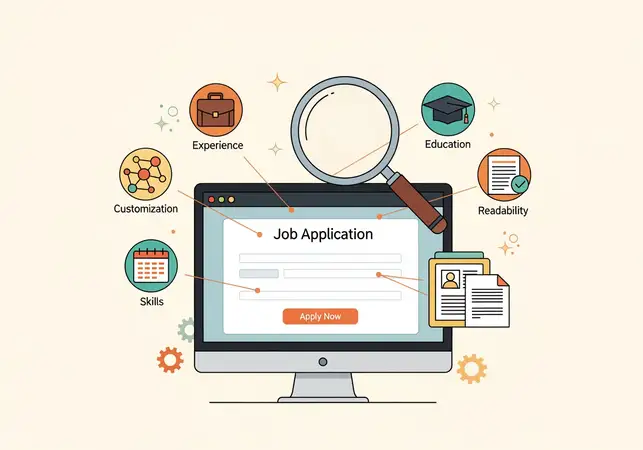
In today's fiercely competitive job market, your journey to securing a new role often begins not with a human, but with a sophisticated piece of software: the Applicant Tracking System (ATS). Before a human recruiter ever lays eyes on your application, it must successfully navigate this digital gatekeeper. An ATS is a software application designed to manage the entire recruitment and hiring process, acting as a centralized database for job applications. Companies, particularly those receiving hundreds or even thousands of applications for a single opening, rely heavily on ATS to streamline their hiring process, efficiently filter out unqualified candidates, and identify top talent more quickly.
Understanding precisely how this system works and, more importantly, how to meticulously optimize your application for it, is absolutely crucial for any job seeker aiming for success.
The primary function of an ATS is to scan, parse, and rank resumes and cover letters based on specific criteria, predominantly keywords. It meticulously extracts key information such as contact details, work history, educational qualifications, and relevant skills, then compares this data against the requirements explicitly outlined in the job description. If your application doesn't contain the precise keywords the ATS is programmed to look for, or if its formatting is incompatible with the system's parsing capabilities, it might be automatically rejected without a human ever seeing it, regardless of how qualified you are on paper.
This means that even the most stellar resume, packed with impressive experience and achievements, can be overlooked if it's not ATS-friendly, highlighting the necessity of strategic optimization.
How to Optimize for Keywords:
Optimizing your application for keywords is not about mindlessly stuffing your resume with every possible term; rather, it's about strategically and naturally integrating the most relevant ones to ensure your application is accurately recognized by the ATS and deemed a strong match for the role. This thoughtful approach ensures both ATS compatibility and human readability.
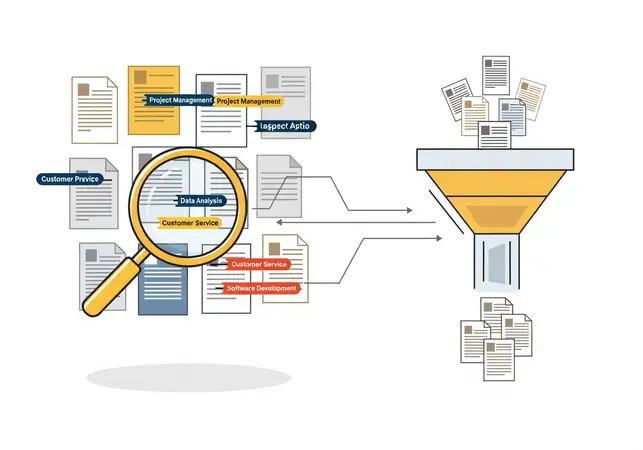
- Analyze the Job Description: This is the absolute bedrock of effective ATS optimization. Don't just skim the job description; dissect it with meticulous attention to detail. Go through it sentence by sentence and mark every single skill, qualification, responsibility, tool, technology, certification, and even soft skill mentioned. Pay extremely close attention to the exact phrasing used. For instance, if the description says "customer relationship management," don't just use "CRM" unless both terms are explicitly mentioned. Identify not only the core competencies but also the desirable traits, specific software, and methodologies. This meticulous analysis will enable you to create a comprehensive and targeted list of keywords that the recruiter is actively seeking, forming the foundation of your tailored application. Consider creating a spreadsheet or a simple list to track these keywords, categorizing them by hard skills, soft skills, tools, and certifications. This systematic approach ensures no critical keyword is missed.
- Mirror the Language: Once you've identified the key terms, make a conscious effort to use the exact terminology from the job description in your resume, cover letter, and other application materials. ATS systems are often programmed to look for precise matches, and even slight variations can sometimes lead to a mismatch. For example, if the job description lists "project management software," using "project planning tools" might not register as a match, even if they refer to similar concepts. This doesn't mean copying sentences verbatim, but rather ensuring that the specific nouns, action verbs, and technical terms are consistent. This direct mirroring helps the ATS recognize that you possess the required skills and qualifications, significantly increasing your chances of passing the initial scan and moving forward in the hiring process. Remember, the goal is to speak the ATS's language, which is often literal.
- Integrate Keywords Naturally: While keyword inclusion is vital, it must be done organically and contextually. Incorporate the keywords seamlessly into your professional summary, dedicated skills section, and detailed experience descriptions. For example, instead of just listing "Data Analysis" under skills, elaborate on it within your experience section: "Performed comprehensive data analysis using SQL and Python to identify market trends, leading to a 15% increase in sales strategy effectiveness and a 10% reduction in operational costs." Similarly, if "Agile Methodology" is a keyword, you might write: "Led cross-functional teams in an Agile methodology framework, delivering 5 key projects ahead of schedule and within budget." Avoid forcing keywords into your application in a way that makes the text sound awkward, repetitive, or unnatural, as this can make it seem spammy and unprofessional to a human recruiter who eventually reviews it. The ultimate goal is to demonstrate genuine, practical experience with these skills, not just a list of terms.
For example, if the job description mentions "data analysis" and "project management," make sure to include these phrases in your resume and cover letter. You can also use variations of these keywords, such as "analyzed data" or "managed projects," to show that you have practical experience with these skills. Additionally, consider including related tools, software, or methodologies if they are mentioned, such as "SQL," "Python," "Tableau," "Agile," or "Scrum," as these often function as critical keywords for specific technical or specialized roles. Always aim for a balance between keyword density and natural language flow. For more specific government job openings, you can always check Sarkari Naukri listings on our portal.
ATS-Friendly Resume Design:
Beyond just keywords, the visual and structural design of your resume plays a crucial role in how an ATS processes your information. An ATS is not a human eye; it's a parser that reads text in a specific, often linear, fashion. Therefore, simplicity and clarity are paramount.
- Standard Sections: Use universally recognized section headings like "Contact Information," "Professional Summary," "Work Experience," "Education," and "Skills." Avoid creative or unusual section titles that an ATS might not recognize. For instance, "My Journey" instead of "Work Experience" might confuse the system.
- Simple Fonts: Stick to standard, clean, and widely available fonts such as Arial, Calibri, Helvetica, or Times New Roman. These fonts are easily readable by ATS software. Avoid highly decorative, custom, or very thin fonts that can be difficult for the system to parse correctly. Ensure the font size is also legible, typically 10-12 points for body text.
- Bullet Points for Experience: Use standard bullet points to describe your responsibilities and achievements under each job role. ATS systems are generally good at parsing information presented in this format. Avoid complex symbols or custom bullet styles. Stick to simple, solid circles or squares.
- No Graphics or Images (Unless Specified): While visually appealing, graphics, charts, logos, and even photos (unless explicitly requested, which is rare for ATS compatibility) can confuse an ATS. The system might not be able to read the text embedded within images, or it might misinterpret the layout. Keep your resume text-heavy and clean. If a company logo is absolutely essential, ensure it's a simple, high-contrast image that doesn't interfere with text parsing.
- Avoid Text Boxes and Tables for Critical Info: Information placed within text boxes or tables can sometimes be overlooked or misparsed by an ATS. Ensure all critical information, especially contact details, job titles, and company names, is in the main body of the document. While tables can be useful for organizing data, they often break the linear parsing logic of an ATS.
- Chronological Format Preference: Most ATS systems are optimized for a reverse-chronological resume format, where your most recent experience is listed first. This format is also preferred by human recruiters as it provides a clear progression of your career. Functional or hybrid resumes, while sometimes useful for career changers, can be more challenging for an ATS to parse effectively.
Common ATS Mistakes to Avoid:
Beyond keyword optimization, certain formatting and content choices can significantly hinder your application's journey through an ATS, leading to an automatic rejection before a human ever sees it.
- Complex Formatting: Avoid intricate designs, excessive graphics, charts, tables, text boxes, or unusual, decorative fonts. While these elements might seem visually appealing to a human eye, they can severely confuse an ATS, leading to incomplete parsing, misinterpretation of your data, or even rendering your application unreadable. Stick to a clean, simple, and linear layout that is easy for software to process.
- Saving in Incorrect File Formats: Unless explicitly requested otherwise, always save your resume as a PDF. PDFs generally preserve formatting better across different systems and devices. However, some older or specific ATS might prefer Word documents (.doc or .docx) for easier parsing. Always check the job application instructions carefully for preferred file types. If no preference is stated, PDF is usually the safest bet. If you're unsure, submitting both a PDF and a .docx version (if the system allows) can be a safe approach.
- Using Headers/Footers for Critical Information: Contact information, job titles, or other vital details placed in headers or footers might be overlooked by some ATS, as they often focus primarily on the main body content of the document. Keep all essential information, such as your name, phone number, email, and LinkedIn profile URL, within the main text flow of your resume to ensure it's captured.
- Irrelevant Information: While it's tempting to include everything you've ever done, an ATS is looking for direct relevance to the job description. Including hobbies, unrelated past experiences, or excessive personal details can dilute the impact of your relevant keywords and make your application seem less focused and professional. Every piece of information should serve a purpose in demonstrating your suitability for the role.
- Not Customizing for Each Role: A generic, one-size-fits-all resume is an ATS's worst nightmare. Each job description is unique, and so should be your application. Failing to tailor your resume for every application is a non-negotiable mistake for ATS success, as it won't contain the specific keywords the system is looking for, leading to a low match score and likely rejection. This customization is the most time-consuming but also the most impactful step.
- Keyword Stuffing: While keywords are crucial, overusing them or inserting them unnaturally (e.g., listing a skill multiple times in a row, or hiding white text with keywords) is a major red flag. Modern ATS systems can detect keyword stuffing, which can lead to your application being flagged as spam and immediately discarded. Focus on natural integration.
- Missing Contact Information: It might seem obvious, but sometimes contact details are incomplete or incorrect. Ensure your name, professional email address, and phone number are clearly visible and accurate. A recruiter cannot contact you if this information is missing or wrong. Double-check this before every submission.
- Grammar and Spelling Errors: While an ATS might not directly penalize for these, human recruiters certainly will. Errors signal a lack of attention to detail and professionalism. Always proofread meticulously and use grammar checking tools.
The Six-Second Scan
Even after successfully navigating the ATS, your application faces another equally critical hurdle: the human recruiter's initial scan. Recruiters are often overwhelmed with a massive volume of applications, spending an average of just 6-7 seconds on their initial scan of your resume. This incredibly brief window is all you have to make a positive first impression and convince them that your application is worth a closer, more detailed look. During this rapid scan, they are not reading every word; instead, they are looking for specific visual cues and key elements that quickly convey your suitability for the role and prompt them to delve deeper.
This "six-second scan" is a stark testament to the high volume of applications recruiters manage and the efficiency required in their role. Their primary goal during this initial pass is to quickly identify reasons to keep an application for further review or, more commonly, reasons to discard it. Therefore, your resume must be meticulously designed for maximum readability and immediate impact, allowing critical information to jump out instantly. Every element, from the overall formatting to the strategic placement of content, plays a vital role in guiding the recruiter's eye to the most relevant details and making a compelling case for your candidacy.
1. Clean, Professional Formatting
First impressions are predominantly visual. A cluttered, disorganized, or difficult-to-read resume is an immediate turn-off and signals a lack of attention to detail. Conversely, professional formatting signals meticulousness, respect for the recruiter's time, and a structured approach to work.
- Ample White Space: Resist the urge to cram too much information onto a single page. Utilize adequate margins (typically 0.5 to 1 inch on all sides) and generous spacing between sections and bullet points. White space makes your application appear less daunting, easier on the eyes, and allows the recruiter's gaze to rest, making it simpler to digest key information quickly without feeling overwhelmed. It creates a sense of order and professionalism.
- Clear Section Headers: Employ prominent, distinct, and consistently formatted section headers (e.g., "Professional Experience," "Education," "Skills," "Summary," "Projects"). These act as essential signposts, guiding the recruiter directly to the specific information they are seeking. Bold, slightly larger font sizes (e.g., 14-16 points) for headers are highly effective in creating a clear visual hierarchy.
- Consistent Formatting: Maintain absolute uniformity throughout your entire application. This includes consistent font types and sizes, bullet point styles, date formats (e.g., MM/YYYY or Month YYYY), and spacing. Inconsistency suggests carelessness, a lack of attention to detail, and can make your resume look unprofessional and haphazard, undermining your credibility.
- Professional Fonts (10-12pt): Choose legible, professional, and widely available fonts. Sans-serif fonts like Arial, Calibri, Helvetica, or Verdana are generally preferred for their clean appearance and excellent readability on screens. Keep the body text between 10-12 points and headings slightly larger (14-16 points) for optimal readability and visual appeal. Avoid overly decorative, script, or extremely small fonts that strain the eyes.
- Strategic Use of Bold and Italics: Use bolding sparingly and strategically to highlight truly key information such as job titles, company names, quantifiable achievements, or critical skills. Italics can be used for dates, locations, or project names. Overuse of these formatting tools can make the document look cluttered, distracting, and diminish the impact of what you're trying to emphasize.
Visual Hierarchy: Guiding the Recruiter's Eye
Understanding how recruiters scan a resume is key to designing it effectively. Their eyes typically follow an F-pattern or E-pattern, quickly scanning the top, then down the left side, and then across. Your resume's layout should facilitate this natural scanning behavior.
- Top-Heavy Information: Place your most impactful and relevant information at the top of the resume. This includes your contact details, a compelling professional summary, and your most recent or relevant job title and company. This ensures that the most critical details are seen first.
- Left Alignment: Most resumes are read from left to right. Aligning key information (job titles, company names, dates) to the left margin makes it easier for recruiters to quickly parse through your career progression. This also helps in maintaining a clean, structured look.
- Bullet Point Structure: Use concise, action-oriented bullet points for your experience. Start each bullet with a strong verb and keep them to one or two lines. This makes the information digestible and allows recruiters to quickly grasp your responsibilities and achievements. Avoid long, paragraph-style descriptions.
- Strategic Use of White Space: As mentioned, white space isn't empty; it's a design element that improves readability. Use it to break up dense blocks of text and create visual breathing room between sections, making the document less intimidating and easier to navigate.
- One-Page vs. Two-Page Resumes: For candidates with less than 10 years of experience, a one-page resume is generally preferred. For more experienced professionals, a well-structured two-page resume is acceptable, but ensure the most critical information is on the first page. Never exceed two pages unless specifically requested for highly specialized or academic roles.
2. Relevant Job Titles and Companies
Recruiters immediately scan your work history to quickly ascertain if you possess relevant experience that aligns with the role they are trying to fill. They are looking for a clear career progression and experience in industries or companies similar to their own. Make absolutely sure your job titles and company names are clearly visible, easy to read, and accurately reflect your responsibilities. If your official job title was non-standard or highly internal (e.g., "Synergy Facilitator" for a Project Manager), consider adding a brief, commonly understood equivalent in parentheses (e.g., "Synergy Facilitator (Project Manager)").
This quick scan helps them determine if your professional trajectory matches the requirements of the open position and if your background is a good fit for their organizational context. Highlighting well-known companies or organizations, especially in the government sector, can also instantly add credibility to your profile. For instance, if you've worked for a prominent PSU or a central government department, ensure that is clearly visible.
3. Quantifiable Achievements
Numbers speak louder than words because they provide concrete, verifiable evidence of your impact and success. Recruiters want to see what you achieved, not just a list of what you were responsible for. Instead of a vague statement like "improved sales," articulate it with impact: "Increased sales by 35% in Q2 through targeted marketing campaigns and client engagement initiatives, contributing to a 1.2 Cr revenue growth." Or, instead of "managed a team," state "Successfully led a team of 8 junior analysts, improving project completion rates by 20% and fostering a collaborative work environment that reduced staff turnover by 15%." Quantifiable achievements immediately demonstrate your value, problem-solving abilities, and the tangible results you delivered in your previous roles. Use metrics, percentages, monetary values, time savings, or specific project outcomes whenever possible to make your contributions undeniable. Even for roles that aren't sales-focused, you can quantify: "Streamlined data entry processes, reducing error rates by 10% and saving approximately 5 hours of manual work per week." This approach provides concrete proof of your capabilities and makes your resume far more impactful.
4. Keywords and Skills Match
While the ATS looks for keywords in a technical, algorithmic sense, human recruiters also quickly scan for terms that directly match the job requirements. They want to see that you possess the core competencies, technical skills, and essential soft skills necessary for the role. Make sure to strategically include the keywords from the job description in your application, especially in your skills section, professional summary, and the bullet points describing your experience. This quick visual confirmation helps them connect your profile directly to the job's demands. Distinguish clearly between hard skills (e.g., "Python," "SQL," "Digital Marketing," "SAP ERP") and relevant soft skills (e.g., "Leadership," "Communication," "Problem-solving," "Teamwork," "Adaptability") that are often explicitly mentioned or implied in job descriptions.
A dedicated "Skills" section, often divided into technical and soft skills, allows for quick visual scanning. Consider creating a "Core Competencies" or "Key Skills" section at the top of your resume, immediately below your summary, to make these keywords instantly visible to the recruiter.
5. The Power of a Strong Summary/Objective
Positioned prominently at the very top of your resume, a compelling professional summary or objective statement is your succinct elevator pitch. In those crucial six seconds, this section has the power to immediately grab a recruiter's attention and compel them to read further. It should be a concise paragraph (typically 3-5 lines) that highlights your most relevant skills, experience, and career goals, meticulously tailored specifically to the job you're applying for. Use strong action verbs and incorporate key skills and quantifiable achievements from the job description. For experienced professionals, a summary focusing on your value proposition and key contributions is ideal. For freshers, recent graduates, or those changing careers, an objective statement outlining your career aspirations and how they align with the specific role and company can be highly effective, demonstrating focus and enthusiasm. For example, a professional summary might read: "Highly accomplished Project Manager with 8+ years of experience leading complex IT infrastructure projects for government clients. Proven ability to deliver projects on time and within budget, reducing operational costs by 18% and improving team efficiency by 25%. Seeking to leverage expertise in Agile methodologies and stakeholder management to contribute to [Company Name]'s strategic initiatives."
Beyond the Resume
While your resume is undoubtedly a cornerstone of your job application, it's crucial to understand that recruiters evaluate a broader spectrum of your professional presence. Your application is a comprehensive package, and each component offers a unique opportunity to reinforce your qualifications, showcase your personality, and make a strong, holistic impression. Neglecting these additional elements can significantly undermine even the most perfectly crafted resume, as they provide context, depth, and further evidence of your suitability.
Your Cover Letter
Often underestimated, a well-written, customized cover letter is your chance to tell a compelling story that your resume, by its nature, cannot. It's an invaluable opportunity to showcase your personality, passion for the role, and direct relevance to the specific company and position. Think of it as your personal sales pitch, explaining why you are the ideal candidate.
- Address it to a Specific Person: Generic salutations like "To Whom It May Concern" are impersonal, outdated, and signal a lack of effort. If possible, always address your cover letter to a specific person, such as the hiring manager, team lead, or the recruiter. You can often find this information on LinkedIn, the company website, or by making a polite, brief call to the company's HR department. If you absolutely cannot find a specific name, use "Dear Hiring Manager," "Dear [Department Name] Team," or "Dear Recruitment Team." This small effort demonstrates initiative and attention to detail.
- Show You've Researched the Company: Demonstrate genuine interest and enthusiasm by referencing specific aspects of the company. Mention recent projects, company values, mission statements, recent news articles, awards, or specific products/services that resonate with you. This shows you've done your homework, understand their culture, and are genuinely interested in their organization, not just any job opening. Connect your values with theirs. For example, "I was particularly impressed by [Company Name]'s recent initiative to [specific project/value], which aligns perfectly with my commitment to [your value/skill]."
- Connect Your Experience to Their Needs: This is where you bridge the gap between your past accomplishments and their future requirements. Don't just list your experiences; explain how your specific skills, achievements, and past experiences directly address the challenges, requirements, and opportunities outlined in the job description. Use concrete examples and anecdotes to illustrate how you can add immediate value to their team, solve their problems, and contribute to their goals. This demonstrates foresight and a problem-solving mindset. Structure your letter to directly answer the question: "Why me for this role at this company?"
- Keep it Under One Page: Recruiters are busy and appreciate conciseness. Your cover letter should be compelling, to the point, and ideally no more than one page in length. Focus on quality over quantity, ensuring every sentence adds significant value and strongly reinforces your candidacy. Avoid repeating information directly from your resume; instead, elaborate and provide context.
- Include a Call to Action: Conclude your cover letter by reiterating your enthusiasm for the role and expressing your eagerness for an interview. For example, "I am confident that my proven skills in [Skill 1], [Skill 2], and [Achievement] make me an ideal candidate for this challenging position, and I eagerly look forward to the opportunity to discuss my qualifications further in an interview." This proactive closing encourages the recruiter to take the next step.
Your LinkedIn Profile
In today's digital age, your LinkedIn profile serves as your professional online brand and is often the first place recruiters go after reviewing your resume. It should complement and expand upon your resume, offering a more dynamic, comprehensive, and interactive view of your professional journey and capabilities.
- Professional Headshot: Use a high-quality, professional headshot as your profile picture. It should be recent, well-lit, show you smiling and approachable, and ideally feature a plain background. Avoid selfies, casual photos, group shots, or outdated images. A professional image builds immediate credibility and makes a strong first impression.
- Compelling Headline: Your LinkedIn headline is more than just your current job title. It's a prime piece of digital real estate to summarize your expertise, key skills, and career aspirations. Use keywords relevant to your target roles. For example, instead of "Marketing Manager," try "Digital Marketing Strategist | SEO & Content Expert | Driving Brand Growth & ROI | Certified Google Ads Professional." This helps you appear in relevant recruiter searches.
- Detailed Summary (About Section): Write a detailed summary (the "About" section) that tells your professional story in a narrative format. This is your chance to elaborate on your experience, skills, and career goals beyond bullet points. Include relevant keywords, highlight key achievements with metrics, and express your passion for your field. Think of it as an expanded, more personal professional summary from your resume.
- Recommendations and Endorsements: Social proof is incredibly powerful. Actively ask for recommendations from previous colleagues, managers, or clients who can speak to your work ethic, specific skills, and achievements. Endorsements for relevant skills also add significant weight and credibility to your profile, showing that others recognize your capabilities.
- Activity and Engagement: A dormant LinkedIn profile is less impactful. Actively engage with content relevant to your industry, share insightful articles, comment thoughtfully on posts, and participate in professional groups. This demonstrates your ongoing interest, thought leadership, and active connection to your professional community, showcasing your passion and current knowledge.
- Custom URL: Customize your LinkedIn profile URL to make it clean and professional (e.g., linkedin.com/in/yourname). This looks much better on your resume and in email signatures.
- Showcase Your Work: LinkedIn allows you to upload media, presentations, and links to projects. Utilize this feature to visually demonstrate your work, especially for creative or project-based roles. This adds another layer of depth to your profile.
Online Portfolios and Work Samples
For certain roles, particularly in creative, technical, or project-based fields, an online portfolio or a collection of work samples can be a game-changer. This goes beyond what a resume or LinkedIn profile can convey, offering tangible proof of your skills and accomplishments.
- Curated Content: Select your best and most relevant work. Quality over quantity is key. Ensure the samples directly relate to the type of work you'd be doing in the target role. For a content writer, this might be articles or blog posts; for a software developer, code repositories or deployed applications.
- Context and Explanation: For each project or sample, provide a brief description of your role, the challenges faced, the actions you took, and the results achieved. This gives recruiters insight into your thought process and impact. Don't just show; tell the story behind the work.
- Easy Accessibility: Host your portfolio on a professional platform (e.g., Behance, GitHub, personal website) and ensure it's easy to navigate. Include a direct link prominently on your resume and LinkedIn profile. Ensure links are active and lead directly to the content.
- Regular Updates: Keep your portfolio current with your latest and most impressive work. A stale portfolio can suggest a lack of recent engagement or skill development.
- Tailor for the Role: Just like your resume, consider tailoring your portfolio to highlight projects most relevant to the specific job you're applying for. You might have a master portfolio, but for a specific application, curate a subset or highlight particular projects.
Your Email Communication
Every email you send during the job application process is a direct reflection of your professionalism, attention to detail, and communication skills. From the initial application submission to follow-ups and interview scheduling, your email etiquette speaks volumes about you as a potential employee.
- Professional Email Address: Always use a professional email address. Ideally, this should be a variation of your name (e.g., "firstname.lastname@email.com" or "f.lastname@email.com"). Avoid generic, unprofessional, or outdated addresses (e.g., "partyanimal23@email.com," "cutiepie@email.com," or "gamerdude123@email.com"). This is a fundamental aspect of professional branding and credibility.
- Clear Subject Lines: Use clear, concise, and informative subject lines that immediately summarize the purpose of your email. For example, "Application for [Job Title] - [Your Name]," "Follow-up: [Job Title] Application - [Your Name]," or "Interview Confirmation - [Your Name] - [Job Title]." This helps recruiters quickly identify the email's content and manage their inbox efficiently.
- Concise, Error-Free Messages: Keep your emails brief, polite, and directly to the point. Recruiters appreciate brevity and clarity. More importantly, ensure your emails are meticulously proofread for any typos, grammatical errors, or awkward phrasing. Errors in email communication can create an impression of carelessness, poor communication skills, or a general lack of professionalism, which can be detrimental to your candidacy.
- Timeliness of Responses: Respond promptly to any emails or phone calls from the recruiter or hiring manager. A quick and professional response demonstrates your enthusiasm, responsiveness, and good communication skills – all highly valued traits in any workplace. Aim to respond within 24 hours, if not sooner.
- Professional Email Signature: Include a professional email signature with your full name, phone number, and LinkedIn profile URL. This makes it easy for the recruiter to contact you and access your professional profile.
- Appropriate Tone: Maintain a professional and respectful tone in all communications. Avoid overly casual language, emojis, or excessive exclamation marks.
Red Flags Recruiters Watch For
While recruiters are actively looking for reasons to hire you, they are also keenly aware of "red flags" – warning signs that might indicate a candidate is not a good fit, lacks professionalism, or could pose potential challenges within the team or organization. Avoiding these common pitfalls is just as important as highlighting your strengths, as a single red flag can sometimes outweigh numerous positive attributes.
- Unexplained Employment Gaps: Gaps in your employment history can raise legitimate questions about your consistency or commitment. If you have periods where you weren't working, address them proactively and transparently in your cover letter or a brief, positive note on your resume. Explain the reason (e.g., further education, travel, family responsibilities, personal growth, health reasons, sabbatical, or even a period of focused job searching) and, if possible, highlight any transferable skills gained or projects undertaken during that time. Transparency and a positive spin are key. For example, "Career break taken to pursue a Master's degree in Public Administration, enhancing skills in policy analysis and strategic planning."
- Job Hopping Without Growth: While changing jobs for career advancement and learning new skills is common and often encouraged, a pattern of frequently moving between roles (e.g., every 6-12 months) without clear progression or demonstrable skill development can be a significant red flag. Recruiters may perceive this as a lack of commitment, inability to adapt, or difficulty working with others. If you have a history of short stints, be prepared to explain the rationale (e.g., contract roles, company downsizing, significant career pivot, or acquiring specific skills). Focus on what you learned and achieved in each role, no matter how short.
- Generic Applications: As discussed earlier, submitting a generic resume and cover letter that clearly hasn't been tailored to the specific job description is a major red flag. It signals a lack of genuine interest, laziness, and poor attention to detail. Recruiters can spot these from a mile away. Always customize your application to align with the job's requirements and the company's culture.
- Inconsistent Information: Discrepancies between your resume, LinkedIn profile, and other application materials (e.g., different employment dates, job titles, or responsibilities) immediately raise questions about your honesty and attention to detail. Ensure all your professional profiles are consistent and up-to-date.
- Poor Communication Skills: Typos, grammatical errors, awkward phrasing, or an unprofessional tone in your emails or application documents are significant red flags. They suggest a lack of professionalism, poor attention to detail, and weak communication skills – qualities that are critical in almost any role. Always proofread meticulously.
- Lack of Professionalism in Online Presence: Recruiters often check social media profiles. An unprofessional online presence (e.g., inappropriate posts, controversial opinions, or excessive negativity) can be a major deterrent. Ensure your public online profiles reflect a professional image.
- Negative Talk About Past Employers: During interviews or even in cover letters, speaking negatively about former employers, colleagues, or managers is a huge red flag. It suggests a lack of professionalism, an inability to handle conflict constructively, and a potentially difficult personality. Always maintain a positive and respectful tone, even when discussing challenging past experiences.
- Over-reliance on Buzzwords Without Substance: While keywords are important, simply listing buzzwords without providing concrete examples or quantifiable achievements to back them up is ineffective. It can make your application sound hollow and insincere. Recruiters want to see how you applied those skills to achieve results.
- Unrealistic Salary Expectations: While salary discussions typically happen later, if you provide an extremely high or low salary expectation early on that is out of sync with the market or the role, it can be a red flag. Research average salaries for similar roles in the industry and location.
- Failure to Follow Instructions: Not adhering to application instructions (e.g., submitting the wrong file type, missing required documents, or not answering specific questions) demonstrates a lack of attention to detail and an inability to follow directions. This can lead to immediate disqualification.
FAQ
What is an Applicant Tracking System (ATS) and why is it important?
An ATS is a software program used by companies to manage recruitment and hiring. It scans, parses, and ranks resumes based on keywords and formatting. It's crucial because your application must be ATS-friendly to even be seen by a human recruiter, especially for government jobs where application volumes are very high. Optimizing for ATS ensures your qualifications are recognized by the system.
How can I make my resume stand out in the "six-second scan"?
To stand out in the six-second scan, focus on clean, professional formatting with ample white space, clear section headers, and consistent design. Place your most impactful information (professional summary, key skills, quantifiable achievements) at the top. Use strong action verbs and quantify your achievements with numbers and metrics. Ensure your resume is easy to read and visually guides the recruiter's eye to the most relevant details. For more tips on government job results, you can check our results page.
Should I include a cover letter for every job application?
Yes, absolutely. While some application systems might not explicitly require it, a well-written, customized cover letter is a powerful tool. It allows you to tell your story, express genuine interest in the specific role and company, and connect your experiences directly to their needs in a way your resume cannot. It demonstrates initiative, strong communication skills, and a higher level of professionalism, significantly boosting your candidacy. Even if not mandatory, it's always a good practice to include one. For specific government job admit cards, check our admit cards section.
Related: ATS Tips | Resume Guide
TrueJobs Editorial Team
TrueJobs editorial desk
This article is prepared from the sources referenced in the guide and reviewed for clarity, links and dated information. Read our editorial and corrections policy.
Continue This Topic
Follow the closest earlier and newer coverage so older archive posts keep real contextual crawl paths.
Read Next
Best Career Options After 12th in India

Best Career Options After Graduation in India

Freelancing vs Full-Time Jobs: Pros and Cons

How to Build a Career Without Campus Placement
Explore Topics
Perfect Your Resume
Use our AI-powered Resume Builder to create ATS-optimized resumes.
AI Resume Builder