
Career guide
ATS-Friendly Resume: Beat Tracking Systems — Explained
Learn how to create an ATS-friendly resume that passes applicant tracking systems and gets you interviews.

Most companies in India now use Applicant Tracking Systems (ATS) to filter resumes before a human recruiter sees them. Understanding how ATS works can dramatically improve your chances of getting shortlisted. In today's competitive job market, especially given the sheer volume of applications for popular roles in India, an ATS-friendly resume isn't just an advantage, it's a necessity. This comprehensive guide from TrueJobs will equip you with the knowledge and tools to craft a resume that not only passes ATS screenings but also impresses human recruiters.
What is an ATS?
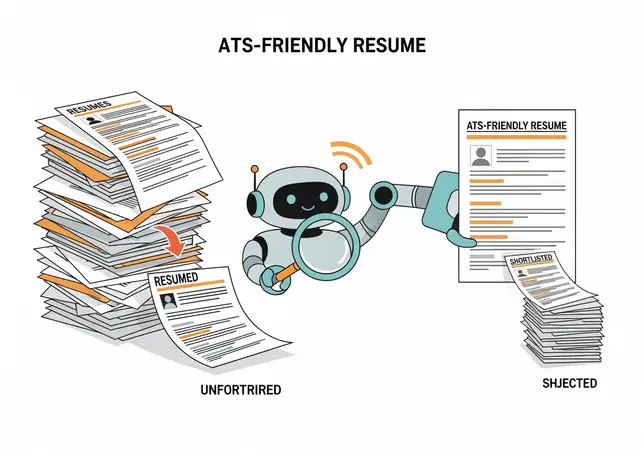
An ATS, or Applicant Tracking System, is sophisticated software designed to streamline the recruitment process. It acts as a digital gatekeeper, scanning, sorting, and ranking resumes based on predefined criteria, including keywords, formatting, and overall relevance to a specific job description. Before your resume even reaches a human recruiter's desk (or inbox), it typically undergoes an initial ATS scan. Over 75% of large and even many medium-sized companies in India, particularly in sectors like IT, finance, manufacturing, and pharmaceuticals, utilize some form of ATS for their recruitment drives. Without an ATS-friendly resume, your application might be automatically rejected, regardless of your qualifications.
The Rise of ATS in India
The adoption of ATS in India has surged in recent years, driven by the sheer volume of applications for popular government and private sector jobs. India's vast talent pool and the high number of graduates entering the workforce annually mean that recruiters are often inundated with thousands of applications for a single opening. Companies like TCS, Infosys, HDFC Bank, Reliance, and many government organizations now rely on ATS platforms (such as Workday, Taleo, SAP SuccessFactors, Greenhouse, Zoho Recruit, or custom-built solutions) to manage the initial screening phase. This shift from manual resume review to automated filtering has made it imperative for job seekers to understand and adapt to ATS requirements.
Failing to do so means your carefully crafted resume might never be seen by a human, effectively landing your application in a "resume black hole." The digital transformation across industries and the need for efficient, scalable hiring processes have further accelerated ATS adoption, making it a standard gatekeeper in almost every major recruitment drive.
How Does ATS Work?
An ATS performs several key functions, acting as the first filter in the hiring pipeline:

- Parsing: This is the initial step where the ATS extracts data from your resume. It reads through the document, identifying and categorizing information like contact details, work history, education, and skills into structured fields within its database. Think of it as converting your free-form resume into a structured data entry. If your resume's formatting is complex (e.g., tables, graphics, multi-column layouts), the ATS may struggle to parse accurately, leading to missing or misinterpreted information. This can result in your experience or skills not being recognized, even if they are present.
- Keyword Matching: The ATS compares keywords in your resume against those in the job description or a pre-defined list set by the recruiter. These keywords can include specific skills, tools, certifications, job titles, industry jargon, or even soft skills. The system looks for exact matches, synonyms, and related terms. The more relevant matches found, the higher your resume's score or relevance ranking. This is why tailoring your resume for each application, using the exact language from the job description, is crucial.
- Ranking: Based on the keyword relevance score, experience length, educational qualifications, and other criteria defined by the recruiter, the ATS assigns a score or rank to each application. Recruiters often set minimum score thresholds. Resumes with higher scores are typically presented to the recruiter first, increasing their visibility and likelihood of being reviewed by a human. This ranking system helps recruiters prioritize their review process.
- Filtering: Recruiters can set specific filters to automatically reject resumes that do not meet minimum requirements. Examples include a specific degree (e.g., "B.Tech in Computer Science"), a minimum number of years of experience (e.g., "3+ years in project management"), or the absence of critical keywords (e.g., "proficiency in Python"). These filters are non-negotiable; if your resume doesn't meet these basic criteria, it will be automatically discarded, regardless of other qualifications. This automated filtering significantly reduces the manual workload for recruiters, allowing them to focus on a pre-qualified pool of candidates.
Why is an ATS-Friendly Resume Crucial for Indian Job Seekers?
Considering the scale of job applications in India, recruiters are often inundated with thousands of resumes for a single opening. An ATS helps them manage this volume efficiently and effectively. For you, the job seeker, this means:
- Increased Visibility: An ATS-optimized resume significantly increases the likelihood of your application successfully passing the initial automated screening, ensuring it reaches a human recruiter's desk. Without it, your application might be discarded before anyone even sees your qualifications, making all your efforts in building skills and experience futile if they aren't presented in an ATS-readable format.
- Reduced Manual Effort for Recruiters: For recruiters, ATS minimizes the time spent sifting through unsuitable applications, allowing them to focus on a pre-qualified pool of candidates. This efficiency is paramount in high-volume recruitment scenarios common in India, where a single job posting can attract hundreds, if not thousands, of applicants. By presenting an ATS-friendly resume, you're making the recruiter's job easier, which can subtly work in your favor.
- Fairer Initial Screening (Theoretically): While not perfect, ATS aims to provide a consistent, objective initial screen based on predefined criteria, reducing human bias in the very first stage. It evaluates resumes based on quantifiable matches to job requirements, rather than subjective impressions. However, its limitations (as we'll discuss) require strategic resume writing to ensure your profile is accurately represented and not unfairly penalized by formatting issues.
- Faster Application Process: Many ATS platforms are integrated with online application forms, making the submission process quicker and more streamlined for candidates. This integration also means the ATS is often the first point of contact for your resume, directly parsing information from your uploaded document into the application fields. An ATS-friendly resume ensures this data transfer is seamless and accurate.
- Competitive Edge: In a job market as competitive as India's, where thousands apply for a handful of positions, an ATS-friendly resume isn't just a good practice; it's a critical differentiator that can set you apart from equally qualified candidates who haven't optimized their documents. It's the first step to standing out in a crowded field, ensuring your qualifications get the attention they deserve.
The Indian Context: Volume and Diversity
The Indian job market presents unique challenges and opportunities. With a vast talent pool and a high number of graduates entering the workforce annually, the volume of applications for popular roles, especially in government sectors, IT, and banking, is immense. An ATS becomes an indispensable tool for organizations to manage this influx, allowing them to process applications at scale. Furthermore, the diversity in educational backgrounds, regional languages (though professional resumes are predominantly in English), and varied work experiences across India necessitates a standardized, machine-readable format to ensure fair and efficient processing. An ATS-friendly resume helps bridge these gaps, ensuring your qualifications are understood regardless of the recruiter's background or the sheer volume of applications they face.
It standardizes the initial screening, making it possible for companies to evaluate candidates from diverse educational institutions and professional backgrounds across the country on a common platform. This is particularly relevant for pan-India recruitment drives where candidates from various states and educational boards apply.
Key ATS-Friendly Formatting Rules
ATS software prefers simplicity and predictability. Think of it as a machine that needs clear, structured data to process effectively. Complex designs, while visually appealing to humans, often confuse an ATS and lead to misinterpretation or incomplete parsing of your information. Adhering to these formatting rules ensures your resume's content is accurately extracted and understood.
- Use Standard Section Headings: Stick to universally recognized headings that an ATS can easily identify and categorize. Using non-standard headings can cause the ATS to misinterpret or completely miss crucial sections of your resume, making your valuable experience invisible.
- Recommended: Contact Information, Summary/Objective, Work Experience, Education, Skills, Projects, Certifications, Awards, Volunteer Experience, Publications. These are standard and easily recognized by virtually all ATS.
- Avoid: "My Awesome Journey," "What I've Done," "Skill Set Spectrum," "Career Highlights," "Professional Background." While creative, these headings are ambiguous to an ATS.
- Practical Tip: Ensure consistency in your headings. If you use "Work Experience," don't switch to "Professional History" later in the document. Maintain uniform capitalization and phrasing.
- Avoid Tables, Graphics, and Text Boxes: These elements are notoriously difficult for ATS to parse accurately. Information contained within them might be completely skipped or scrambled, rendering it invisible to the system. ATS primarily reads text in a linear fashion.
- Practical Tip: Instead of a table to list skills or achievements, use a simple bulleted list. For example, rather than a two-column table for "Skills," list them vertically under a "Skills" heading. Instead of a text box for your summary, write it as a standard paragraph. Visual elements like charts, graphs, embedded images (even company logos), or complex icons should be avoided entirely. They add no value for the ATS and pose a significant risk of parsing errors.
- Choose Simple, Widely-Used Fonts: Stick to industry-standard, sans-serif fonts that are easy for ATS (and humans) to read. Complex or decorative fonts can be misinterpreted by the ATS's optical character recognition (OCR) capabilities, leading to garbled text or missed words.
- Recommended: Arial, Calibri, Helvetica, Verdana, Lato, Roboto, Georgia, Times New Roman. These fonts have clear, distinct characters and are universally recognized.
- Avoid: Decorative, highly stylized, or handwritten-style fonts (e.g., Comic Sans, Papyrus, script fonts). These are difficult for machines to read and often look unprofessional.
- Font Size: Maintain readability with 10-12pt for body text and 14-16pt for headings. Too small a font can be missed by ATS, and too large looks unprofessional and wastes valuable space. Consistency in font size across similar elements is also important.
- Save Your Resume as a PDF or DOCX File: Always check the job description for preferred file types, as some companies explicitly state their preference. If none is specified, PDF is generally a safe bet.
- PDF: Often preferred as it maintains formatting across different systems and devices, preventing layout shifts. Most modern ATS can easily parse PDFs, preserving your resume's visual integrity. It's a good choice for ensuring your resume looks exactly as you intended.
- DOCX: Also widely accepted, especially by older ATS versions. If you're unsure about the ATS's modernity, or if the job description mentions DOCX, it's a safe choice. Some ATS systems might prefer DOCX for easier data extraction.
- Avoid: JPG, PNG, Pages, ODT, or plain TXT files. Image files are unreadable by ATS, and plain text strips all formatting, making it hard for humans to read and potentially confusing the ATS's ability to categorize information.
- Keep the Layout Clean and Single-Column: A multi-column layout can confuse an ATS, causing it to read sections out of order (e.g., reading across columns instead of down) or ignore entire columns. ATS systems are designed to read from left to right, top to bottom.
- Actionable Advice: Opt for a chronological, single-column format. This ensures that the ATS reads your resume from top to bottom, as intended, parsing information in a logical sequence. Avoid sidebars or complex grid layouts.
- White Space: Don't be afraid of white space. It enhances readability for both ATS and human eyes by making the document less cluttered and easier to scan. Adequate margins and spacing between sections improve the overall flow and prevent parsing errors.
- Minimalist Design: While design is important for readability, keep it subtle. Avoid heavy use of colors, intricate designs, or complex background patterns. Stick to black text on a white background for maximum compatibility and clarity. The focus should be on content, not elaborate aesthetics. Overly designed resumes, while visually appealing to some, are often detrimental to ATS compatibility.
- Avoid Headers and Footers for Critical Information: Some older ATS systems struggle to read text placed in headers or footers. To ensure all critical information (like contact details or a summary) is parsed correctly, keep it within the main body of your resume. This guarantees that your name, contact number, email, and LinkedIn profile are always captured.
Keyword Optimization: The Heart of ATS Success
Keyword optimization is arguably the most critical aspect of creating an ATS-friendly resume. ATS software primarily scans for keywords to determine relevance and match your profile to the job requirements. Without the right keywords, your resume may never pass the initial screening, regardless of your qualifications.
- Carefully Read the Job Description (JD): This is your primary source of keywords. Read it multiple times, highlighting the skills, qualifications, responsibilities, and technologies mentioned repeatedly. Pay attention to both explicit requirements (e.g., "Proficiency in Python") and implied expectations (e.g., "Manage cross-functional teams" implies leadership and collaboration skills).
- Pro Tip: Copy the JD into a word cloud generator (online tools like WordArt.com or WordClouds.com are available) to visually identify frequently used words. This helps you understand what the company values most for that specific role. Look for synonyms and related terms as well. For instance, if the JD mentions "customer relationship management," also consider "client engagement" or "CRM software."
- Actionable Advice: Create a master list of keywords from the JD. Categorize them into "must-haves," "nice-to-haves," and "soft skills." This will guide your resume tailoring process.
- Incorporate Relevant Keywords Naturally: Don't just stuff keywords into your resume. Weave them organically into your experience descriptions, skills section, and summary/objective. The goal is to demonstrate how you possess and have applied these skills, not just list them. ATS systems are becoming smarter at detecting keyword stuffing, which can flag your resume negatively.
- Example for a "Software Developer" role requiring "Java, Spring Boot, Microservices, Agile, AWS":
- Instead of: "Developed software."
- Use (Experience Section): "Designed and developed robust Java applications using Spring Boot following Agile methodologies, contributing to a microservices architecture deployed on AWS, resulting in a 20% improvement in system scalability."
- Example for a "Digital Marketing Manager" role requiring "SEO, SEM, Content Marketing, Google Analytics, Social Media Strategy":
- Instead of: "Handled marketing."
- Use (Experience Section): "Led comprehensive digital marketing campaigns, driving organic traffic through advanced SEO techniques and managing paid campaigns via SEM. Developed and executed successful content marketing strategies, leveraging insights from Google Analytics to refine social media strategy and increase engagement by 30%."
- Example for a "Financial Analyst" role requiring "Financial Modeling, Valuation, Excel, Data Analysis, GAAP":
- Instead of: "Did financial reports."
- Use (Experience Section): "Performed in-depth financial modeling and valuation for M&A targets, utilizing advanced Excel functions for data analysis and ensuring compliance with GAAP standards, contributing to successful acquisition of a startup valued at INR 5 Crore."
- Use Both Spelled-Out Terms and Abbreviations: Many ATS are sophisticated enough to recognize common abbreviations, but it's always safer to include both, especially for technical terms, certifications, or widely recognized acronyms. This covers all bases, regardless of the ATS version or its specific configuration.
- Example: "Search Engine Optimization (SEO)," "Certified Public Accountant (CPA)," "Master of Business Administration (MBA)," "Artificial Intelligence (AI)," "Project Management Professional (PMP)," "Customer Relationship Management (CRM)," "Enterprise Resource Planning (ERP)."
- Include Industry-Specific Skills and Certifications: These are prime keywords that indicate your domain expertise and readiness for the role. Ensure they are listed clearly and accurately. Recruiters often filter for these specific qualifications.
- Technical Skills: Programming languages (Python, Java, C++), frameworks (React, Angular, Django), databases (SQL, MongoDB, Oracle), cloud platforms (Azure, GCP, AWS), data analysis tools (Tableau, Power BI, R, SAS), design software (Adobe Photoshop, Illustrator, Figma).
- Soft Skills: While often harder to quantify, integrate soft skills by using action verbs in your experience descriptions (e.g., "Collaborated" for teamwork, "Resolved" for problem-solving, "Led" for leadership, "Communicated" for communication, "Negotiated" for negotiation).
- Certifications: PMP, PMI-ACP, AWS Certified Solutions Architect, Google Analytics Certified, Six Sigma Green Belt, ITIL Foundation, CCNA, Salesforce Administrator.
- Match Your Job Titles to Common Industry Terms: If your company uses unique internal job titles that aren't widely recognized in the industry, consider adding a widely recognized equivalent in parentheses. This helps the ATS understand your role better and match it to standard job titles in its database.
- Example: "Growth Hacker (Digital Marketing Specialist)" or "Client Relations Executive (Account Manager)" or "Software Engineer I (Junior Developer)" or "Associate Consultant (Business Analyst)." This ensures your experience is categorized correctly by the ATS.
Understanding Keyword Types
To optimize effectively, differentiate between various keyword types:
- Hard Skills: Measurable, teachable abilities that are often specific to a job or industry (e.g., Python, SQL, Photoshop, Financial Modeling, SAP, AutoCAD). These are typically the easiest for ATS to detect and are often primary filters.
- Soft Skills: Personal attributes that affect how you work and interact with others (e.g., Communication, Leadership, Problem-solving, Teamwork, Adaptability, Critical Thinking). While harder for ATS to quantify directly, they are often embedded in job descriptions and can be picked up if described with strong action verbs in your experience section.
- Action Verbs: Powerful verbs that describe your accomplishments and responsibilities (e.g., Developed, Managed, Implemented, Analyzed, Led, Optimized, Created, Streamlined, Initiated). These often accompany hard skills and responsibilities, adding context and impact.
- Industry Jargon: Specific terms, acronyms, or phrases common within a particular industry or domain (e.g., KYC in banking, Agile Scrum in IT, GMP in pharmaceuticals, GAAP in accounting, Supply Chain Management).
- Company-Specific Terms: Sometimes, job descriptions might use terms unique to that company, its products, or its internal processes. If relevant and you have experience, include them, but use them judiciously.
Where to Place Keywords
Strategic placement of keywords throughout your resume maximizes their impact and ensures the ATS registers them effectively:
- Summary/Objective: A concise paragraph at the top, embedding 3-5 primary keywords that align with the core requirements of the role. This acts as an immediate signal to the ATS, indicating your relevance from the outset.
- Skills Section: A dedicated section where you can list all your relevant hard and soft skills using bullet points. Categorize them (e.g., Technical Skills, Soft Skills, Tools & Technologies, Languages, Certifications) for readability for both ATS and human recruiters. This section is a prime target for keyword scanning.
- Experience Section: This is where you demonstrate how you applied those keywords. Use action verbs and quantifiable achievements in your bullet points to show the impact of your skills. This section should be rich with context-specific keywords, showing not just *what* you know, but *how* you used it.
- Education: Include your degree, university, and any relevant coursework, thesis topics, or academic projects that contain keywords relevant to the job. For example, if a job requires "Data Structures," mention relevant coursework.
- Projects/Portfolio: If you have personal projects, open-source contributions, or a professional portfolio, describe them and infuse relevant keywords, especially for technical or creative roles. This section can be a powerful way to showcase skills not fully utilized in previous jobs.
Common ATS Mistakes to Avoid
Beyond the positive steps, knowing what not to do is equally important to ensure your resume successfully navigates the ATS. Avoiding these common pitfalls can prevent your application from being prematurely rejected.
- Using Irrelevant Keywords: Don't stuff your resume with keywords that aren't mentioned in the JD or relevant to your actual experience. ATS might flag this as an attempt to game the system, and human recruiters will quickly spot the discrepancy, leading to a negative impression. Authenticity is key.
- Omitting Important Information: Ensure your contact details (name, phone, professional email, LinkedIn URL), work history (including accurate start and end dates for each role), and education (degrees, institutions, graduation dates) are complete and accurate. Incomplete profiles are often automatically filtered out by ATS, as they fail to meet basic data requirements for candidate tracking.
- Fancy Graphics, Images, and Logos: As mentioned, these can confuse ATS. Even company logos in your experience section can sometimes cause parsing issues, leading to the ATS misinterpreting or skipping the associated text. Stick to plain text for maximum compatibility and to ensure all your content is readable.
- Header/Footer Text: Some older ATS systems struggle to read text placed in headers or footers. Keep all critical information, especially contact details, within the main body of your resume to ensure it's parsed correctly. This is a common mistake that can lead to your contact information being missed.
- Small Font Size: While conserving space, anything below 10pt for body text can become difficult for ATS to read accurately, leading to missed keywords or misinterpretations. It also makes your resume hard for human eyes to scan quickly.
- Complex URLs (Hyperlinks): While links to LinkedIn or your portfolio are generally fine, ensure they are simple text links and not embedded in complex designs or hidden behind graphics. The ATS needs to be able to extract the URL text directly. Avoid using URL shorteners that might be flagged as suspicious by some systems.
- Saving in Incorrect File Type: Always adhere to the preferred file type mentioned in the job description. If not specified, PDF or DOCX are safest. Submitting a JPG or PNG will almost certainly result in rejection, as ATS cannot extract text from image files.
- Generic Resumes: Submitting the exact same resume for every job application is a common mistake. A generic resume, by definition, is not optimized for any specific job description and will likely perform poorly against an ATS looking for specific keywords. Always tailor your resume to each role you apply for, even if it means minor adjustments.
- Overly Long Resumes: While ATS doesn't have a strict page limit, excessively long resumes (e.g., 5+ pages for a mid-level role) can dilute keyword density and make it harder for human recruiters to quickly grasp your value. Aim for conciseness and impact. For most roles, 1-2 pages are sufficient; for very senior roles, 3 pages might be acceptable.
- Using a Functional Resume Format: While functional resumes highlight skills over chronological work history, they can confuse ATS systems that are primarily designed to parse chronological work experience. A chronological or hybrid format is generally safer for ATS compatibility.
Practical Steps to Create Your ATS-Friendly Resume
Follow these actionable steps to craft a resume that is both ATS-friendly and compelling to human recruiters:
- Analyze the Job Description Thoroughly: This is your blueprint. Read it multiple times, highlighting key terms, required skills, and responsibilities. Create a comprehensive list of essential keywords you need to include, categorizing them by importance. Look for both hard skills (e.g., "Python," "SQL") and soft skills (e.g., "Leadership," "Communication") and industry-specific jargon.
- Choose a Simple Template: Start with a clean, single-column resume template. TrueJobs' resources often provide suitable templates, or you can use basic, modern templates available in Microsoft Word or Google Docs. Avoid templates with complex designs, multiple columns, heavy graphics, or sidebars. A chronological format is generally preferred by ATS.
- Draft Your Content:
- Contact Info: Include your full name, professional phone number, professional email address, and a clean, publicly accessible LinkedIn Profile URL. Ensure this information is in the main body, not headers/footers.
- Summary/Objective: Tailor this for each job, embedding 3-5 primary keywords that align with the role's core requirements. Make it a concise, impactful paragraph (3-4 sentences) that highlights your most relevant skills and experience.
- Skills: Create a comprehensive list, categorizing them (e.g., Technical Skills, Soft Skills, Tools & Technologies, Languages, Certifications). Use bullet points for clarity. Ensure you include all relevant keywords identified from the JD here.
- Experience: For each role, use strong action verbs and quantify achievements with numbers and metrics whenever possible. Incorporate relevant keywords from the
ATS-Friendly Resume: Beat Applicant Tracking Systems
Learn more: Resume Writing Tips | Job Search Guide
FAQ
What is ATS?Applicant Tracking System softwareDo all companies use it?Over 75% of large firmsRelated Resources
- Free Resume Builder
- Latest Sarkari Naukri Listings
- Government Job Interview Tips
- How to Write a Winning Cover Letter
TrueJobs Editorial Team
TrueJobs editorial desk
This article is prepared from the sources referenced in the guide and reviewed for clarity, links and dated information. Read our editorial and corrections policy.
Continue This Topic
Follow the closest earlier and newer coverage so older archive posts keep real contextual crawl paths.
How Recruiters Actually Shortlist Candidates (Insider Secrets)
Unlock recruiter shortlisting secrets! Learn what makes candidates stand out and boost your job prospects with expert tips.
Gig Economy in India: Opportunities and Challenges
India's gig economy now includes 15M workers in flexible roles. Discover opportunities and challenges shaping this sector.
Read Next

How to Make a Professional Resume in 2026

How to Write a Powerful Resume Summary

Best Resume Format for Freshers in India

How Long Should a Resume Be? (A Practical Guide for Indian Job Seekers)
Explore Topics
Perfect Your Resume
Use our AI-powered Resume Builder to create ATS-optimized resumes.
AI Resume Builder