
Recruitment guide
Govt Exam Crop Tool Mistakes 2026: Avoid Photo — Explained
Discover why even good photos get rejected in government exams 2026 due to crop tool mistakes and learn how to submit perfect photos for your application.

Applying for government exams in India involves meticulous attention to detail, especially when it comes to submitting photographs. Despite having a seemingly perfect photo, many candidates face rejection due to errors caused by the crop tool used during the application process. With 2026 exams approaching, understanding these common mistakes is crucial to avoid unnecessary disqualification and delays.
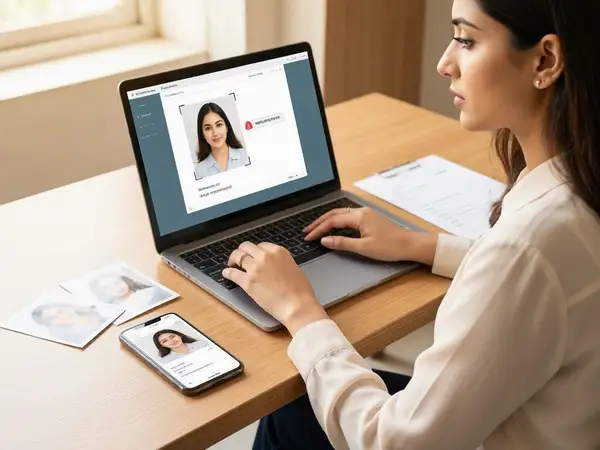
Introduction to Photo Submission in Government Exams
Photo submission is a mandatory part of most government exam applications. The photograph helps in identity verification during the examination and at subsequent stages like document verification and interviews. However, many candidates are unaware that even a good-quality photo can be rejected if it does not meet specific criteria or if it is improperly cropped using the online crop tool provided by exam portals.
Government portals often provide an inbuilt crop tool to help candidates adjust their photos to the required size and format. While this tool is meant to simplify the process, incorrect usage can lead to common mistakes that cause photo rejection. This article explores why good photos still get rejected and how candidates can avoid these crop tool errors in 2026.
Understanding the Importance of Photo Specifications
Before diving into crop tool mistakes, it is essential to know the standard photo specifications required for government exams. These specifications are typically outlined in the official notification and include:

- Photo dimensions (e.g., 3.5 cm x 4.5 cm)
- File size limits (usually between 20 KB to 200 KB)
- Background color (often white or light-colored)
- Format (JPEG/JPG/PNG)
- Face size and placement within the photo
- Recent photo (usually taken within the last 6 months)
Failure to meet these requirements often results in rejection. The crop tool plays a vital role in ensuring the photo fits these parameters, but misuse can cause issues even if the original photo is compliant.
Common Crop Tool Mistakes Leading to Photo Rejection
Despite having a good photo, candidates often make mistakes while using the crop tool. Here are the most frequent errors:
1. Incorrect Aspect Ratio Selection
Government exam portals require photos to be cropped to a specific aspect ratio. If candidates select a wrong ratio or ignore the recommended size, the photo may become distorted or improperly sized. This leads to rejection because the face may appear too small, too large, or off-center.
2. Cropping Out Essential Parts of the Face
Sometimes, candidates crop photos too tightly, cutting off parts of the forehead, chin, or ears. The crop tool can be tricky to handle, and overzealous cropping results in incomplete facial features, which exam authorities do not accept.
3. Including Excessive Background or Other Objects
Another mistake is leaving too much background or including shadows, other people, or objects in the cropped photo. The crop tool should be used to focus solely on the candidate’s face and shoulders as per guidelines.
4. Low Resolution After Cropping
When photos are cropped without maintaining resolution, the final image may become pixelated or blurry. The crop tool sometimes compresses images, causing quality loss. A blurry or unclear photo is often rejected.
5. Ignoring File Size and Format Requirements
After cropping, candidates often forget to check if the file size and format meet the criteria. The crop tool might save the image in a format or size that is not accepted by the application system.
6. Not Centering the Face Properly
The crop tool requires precise positioning to ensure the face is centered vertically and horizontally. Misalignment can cause rejection, as the face must be clearly visible and centered for identity verification.
How to Use the Crop Tool Correctly for Government Exam Photos
To prevent rejection due to crop tool errors, candidates should follow these actionable tips:
- Read Official Guidelines Carefully: Always check the official notification for photo size, format, background, and face dimensions.
- Upload a High-Quality Original Photo: Start with a clear, well-lit photograph with a plain background.
- Use the Crop Tool to Maintain Aspect Ratio: Select the recommended aspect ratio (e.g., 3:4 or 4:5) in the crop tool and avoid manual resizing that distorts the image.
- Ensure Full Face is Visible: Position the crop box to include the full head, face, and shoulders without cutting off any features.
- Center the Face: Align the face in the middle of the crop box both vertically and horizontally.
- Check File Size and Format After Cropping: Use the tool’s preview option to verify file size and format before saving.
- Preview Before Final Submission: Always preview the cropped photo on the application form to confirm clarity and compliance.
Technical Tips to Avoid Photo Rejection
Beyond crop tool usage, candidates should consider these technical tips to ensure their photo passes scrutiny:
- Use a Plain Light Background: Avoid shadows or patterns that may confuse the software or examiners.
- Maintain Proper Lighting: Ensure even lighting to avoid shadows on the face or background.
- Wear Appropriate Attire: Follow dress code guidelines and avoid sunglasses, hats, or heavy makeup.
- Use Trusted Devices and Browsers: Sometimes, crop tools behave differently on various devices or browsers; use recommended platforms.
- Avoid Multiple Edits: Repeated cropping and compression degrade quality; try to get the photo right in one go.
Common Misconceptions About Photo Rejections
Many candidates assume that a good camera or professional photo studio guarantees acceptance. However, the crop tool and submission process can still cause rejection for reasons unrelated to photo quality:
- “My photo looks perfect on my phone, so it will be accepted.” – Often, photos appear clear on small screens but fail resolution or size checks on the portal.
- “The crop tool will fix any issues automatically.” – The tool requires manual adjustment; automatic cropping is rarely perfect.
- “I can submit a photo with any background as long as my face is visible.” – Background color and clarity are strictly monitored.
- “Cropping tightly saves space and is better.” – Over-cropping can cut essential parts and cause rejection.
What to Do If Your Photo Gets Rejected?
If you receive a rejection notice due to photo issues, take these steps:
- Review the Rejection Reason: Understand whether the issue was size, clarity, cropping, or format.
- Revisit the Official Guidelines: Double-check all photo specifications to identify the problem.
- Re-upload a Corrected Photo: Use the crop tool carefully, or consider using third-party photo editing software to prepare the image before uploading.
- Seek Help if Needed: Reach out to helplines or forums for guidance on photo requirements.
- Keep Backup Copies: Save multiple versions of your photo to avoid last-minute stress.
Future Trends: How Technology is Changing Photo Submission
Looking ahead to 2026 and beyond, government exam portals are likely to improve photo upload and verification technology. Some anticipated changes include:
- AI-Powered Photo Verification: Automated systems will detect cropping errors, background issues, and face clarity before submission.
- Improved Crop Tools: More intuitive and user-friendly crop tools with preset templates matching exam requirements.
- Mobile App Integration: Dedicated apps may allow candidates to capture and upload photos directly with built-in compliance checks.
- Real-Time Feedback: Instant alerts during upload about photo issues to reduce rejection rates.
While these advancements will simplify the process, candidates must still understand the basics to avoid errors.
Checks to complete before you apply
Photo rejection due to crop tool mistakes remains a common hurdle for government exam aspirants in India. Even good photos can be rejected if they are improperly cropped, misaligned, or fail to meet technical requirements. By understanding the official guidelines, using the crop tool correctly, and following best practices, candidates can ensure their photos are accepted without hassle.
With 2026 exams on the horizon, preparing your application photo carefully will save you time and reduce stress. Remember to preview your photo after cropping, maintain proper file size and format, and keep backup copies. Staying informed about evolving photo submission technologies will also help you stay ahead in the application process.
For more government exam updates, results, and admit card information, visit our /sarkari-result and /admit-card pages.
Frequently Asked Questions
Q1: Can I use any photo editing software instead of the crop tool?
A1: Yes, you can use photo editing software to prepare your photo, but ensure it meets all official specifications before uploading. The crop tool on the portal is designed to help you meet size and aspect ratio requirements, so use it for final adjustments.
Q2: What is the ideal face size in the cropped photo?
A2: Typically, the face should occupy 70-80% of the photo height, including the forehead and chin, with the face centered. Refer to the specific exam notification for exact measurements.
Q3: Why does my photo get rejected even though it looks clear?
A3: Rejection can occur due to improper cropping, incorrect background, file size issues, or format mismatches. The photo might also fail automated checks if the face is not properly centered or if essential features are cropped out.
Q4: Is it necessary to have a white background in the photo?
A4: Most government exams require a white or light-colored plain background to ensure clarity and uniformity. Colored or patterned backgrounds are usually not accepted.
Q5: How can I check if my cropped photo meets the criteria before submission?
A5: After cropping, preview your photo on the application portal, verify file size and format, and compare it against the official photo specifications. Some portals provide a preview or validation feature to help with this.
Related Resources
- How to Apply for Government Jobs Online
- Sarkari Naukri Document Verification Guide
- Latest Government Job Notifications 2026
Related Government Job Resources
Continue with active job hubs and related government job pages on TrueJobs.
Tools for this recruitment topic
Use only the tools relevant to the dates, eligibility or documents discussed above.
TrueJobs Editorial Team
TrueJobs editorial desk
This article is prepared from the sources referenced in the guide and reviewed for clarity, links and dated information. Read our editorial and corrections policy.
Continue This Topic
Follow the closest earlier and newer coverage so older archive posts keep real contextual crawl paths.
Confirmation Page vs Submitted Application 2026: What Proof You Must Save
Understand the key differences between Confirmation Page and Submitted Application in 2026 government job applications and learn what proof you must save.
Government Exam JPEG vs PDF Upload 2026: Which Documents Need Which Format
Confused about JPEG vs PDF uploads for government exams in 2026? This guide explains which documents need which format to ensure smooth application submission.
Read Next
Aadhaar Authentication in Government Exams 2026: What It Verifies and When It Helps
Government Exam PDF Upload 2026: Scan Resolution, File Size and Readability Checklist
Aadhaar Locked Biometrics 2026: How Candidates Should Unlock Before Exam Day

Government Exam Server Busy 2026: Best Time to Apply & How to Avoid Failed Submission
Explore Topics
Perfect Your Resume
Use our AI-powered Resume Builder to create ATS-optimized resumes.
AI Resume Builder