
Recruitment guide
Govt Exam JPEG vs PDF Upload 2026: Format Guide — Explained
Confused about JPEG vs PDF uploads for government exams in 2026? This guide explains which documents need which format to ensure smooth application submission.

Applying for government exams in India involves meticulous preparation, not only in terms of studying but also in submitting application forms correctly. One common area where candidates often face confusion is the format in which documents need to be uploaded. With the 2026 government exam season approaching, understanding whether to upload documents in JPEG or PDF format is crucial to avoid application rejection and delays.

This comprehensive guide will help you understand the differences between JPEG and PDF formats, which documents require which format during government exam applications, and best practices to ensure your uploads meet official requirements. Whether you are applying for UPSC, SSC, Railway, or State Public Service Commission exams, this article will clarify all your doubts about document uploads.
Understanding JPEG and PDF Formats
Before diving into which documents need which format, it’s important to understand what JPEG and PDF formats are and their typical uses in government exam applications.
What is JPEG?
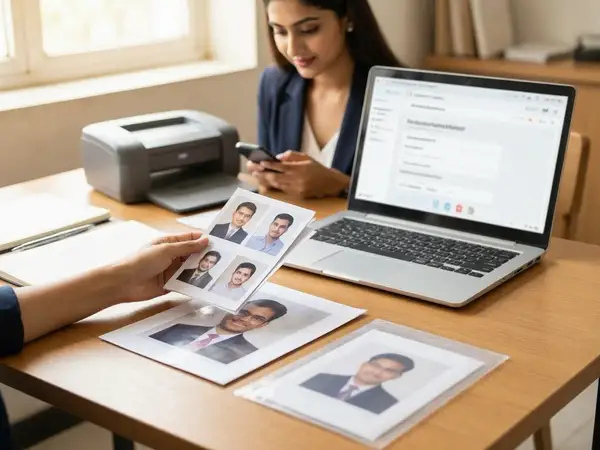
JPEG (Joint Photographic Experts Group) is a commonly used image format primarily for photographs and scanned images. It is a compressed image format that balances quality and file size, making it ideal for photographs such as passport photos or scanned signatures.
What is PDF?
PDF (Portable Document Format) is a versatile file format that preserves the formatting of documents across different devices and platforms. It is widely used for text-heavy documents, certificates, and multi-page files. PDFs can contain images, text, and vector graphics, making them suitable for official certificates, mark sheets, and other documents.
Why Does the Format Matter in Government Exam Applications?
Government exam portals have specific technical requirements for document uploads to ensure smooth processing and verification. Using the wrong format can lead to:
- Rejection of the application form
- Delay in processing your candidature
- Additional stress due to resubmission requirements
Each exam conducting body sets guidelines on file formats, size limits, and resolution. Understanding these helps in submitting error-free applications.
Common Documents Required for Government Exam Applications
Typically, candidates need to upload the following documents during government exam registrations:
- Passport size photograph
- Signature
- Educational certificates and mark sheets
- Category certificate (SC/ST/OBC/EWS)
- Disability certificate (if applicable)
- Identity proof (Aadhaar card, PAN card, etc.)
- Other relevant certificates (domicile, experience, etc.)
Each of these documents may have specific format requirements depending on the exam authority.
JPEG vs PDF for Different Documents: What You Need to Know
Below is a detailed breakdown of which documents should generally be uploaded in JPEG and which in PDF format for government exam applications:
1. Passport Size Photograph
Format: JPEG (or JPG)
Photographs must be uploaded in JPEG format due to the following reasons:
- JPEG supports high-quality color images with relatively small file sizes.
- It is compatible with most online application portals.
- JPEG images maintain clarity for facial features, which is essential for identification.
Specifications to keep in mind:
- Dimension usually ranges from 200x230 pixels to 400x400 pixels.
- File size limits are typically between 20KB and 50KB.
- Background should be plain white or as specified.
2. Signature
Format: JPEG
Signatures are also uploaded as JPEG images because:
- They are usually scanned or photographed handwritten signatures saved as images.
- JPEG files ensure the signature is clear and easily verifiable.
- File size constraints are similar to photographs, generally small and manageable.
3. Educational Certificates and Mark Sheets
Format: PDF
Educational certificates and mark sheets are typically multi-page documents or require preserving the original formatting, so PDF is preferred:
- PDF files preserve the layout, fonts, and graphics of the original certificate.
- They can contain multiple pages in one file, reducing the need for multiple uploads.
- PDFs are widely accepted as official documents by government bodies.
Note: Some portals may allow JPEG scans of certificates, but PDF is safer and more professional.
4. Category Certificates (SC/ST/OBC/EWS)
Format: PDF
Category certificates are official documents issued by government authorities and must be uploaded as PDFs to maintain authenticity and clarity.
5. Disability Certificates
Format: PDF
Disability certificates often contain text and official stamps; hence PDF format is preferred for clarity and preservation of details.
6. Identity Proof Documents
Format: PDF or JPEG (depending on instructions)
For identity proofs like Aadhaar, PAN card, or voter ID:
- PDF is preferred if the document is multi-page or if you have a scanned copy.
- JPEG is acceptable if only a single page or photo of the document is required.
- Always follow the specific instructions mentioned in the application form.
7. Other Certificates (Domicile, Experience, etc.)
Format: PDF
These certificates should be uploaded in PDF format to ensure all details are visible and the document looks professional.
Technical Specifications to Follow for Uploading Documents
Besides choosing the correct format, candidates must adhere to technical specifications to ensure successful uploads:
| Document Type | Format | Size Limit | Resolution/Dimensions | Color Mode |
|---|---|---|---|---|
| Photograph | JPEG | 20KB - 50KB | 200x230 to 400x400 pixels | Color |
| Signature | JPEG | 10KB - 30KB | 140x60 to 200x80 pixels | Color or Black & White |
| Certificates (Education, Category, Disability) | 100KB - 500KB (varies) | Standard A4 size scanned | Black & White or Color | |
| Identity Proof | PDF/JPEG | 100KB - 300KB | Clear scan or photo | Color |
Always check the official notification for exact file size and dimension requirements as they vary between exams.
How to Convert Documents to the Required Format
If your documents are not in the required format, you can easily convert them using various tools:
Converting to JPEG
- Use image editing tools like MS Paint, Adobe Photoshop, or free online converters.
- Scan your photograph or signature directly in JPEG format if possible.
- Ensure the image is cropped properly and meets size requirements.
Converting to PDF
- Scan certificates using a scanner and save as PDF.
- Use free online converters or software like Adobe Acrobat to convert JPEG or PNG files to PDF.
- Combine multiple pages into one PDF file if necessary.
- Check the PDF file size and compress if it exceeds limits using online tools.
Tips to Avoid Common Upload Mistakes
- Read Instructions Carefully: Each exam portal provides detailed instructions for uploads. Follow them strictly.
- Check File Size: Compress files if they exceed the maximum size limit.
- Maintain Clarity: Ensure scanned documents are clear and legible.
- Use Official Tools: Some portals provide tools to crop or resize images—use them if available.
- Keep Backup Copies: Save copies of uploaded files for future reference.
- Test Upload: Before final submission, preview uploaded files to verify correctness.
What to Do If Your Application Is Rejected Due to Format Issues?
If your application gets rejected because of incorrect file format or size, follow these steps:
- Review the rejection reason carefully.
- Convert or resize the documents as per the guidelines.
- Resubmit the application within the correction window.
- Contact the exam authority’s helpdesk if you face persistent issues.
Timely action is crucial to avoid missing deadlines.
Checks to complete before you apply
Uploading documents in the correct format is a vital step in government exam applications. Understanding when to use JPEG and when to use PDF can save candidates from unnecessary rejections and delays. Photographs and signatures are best uploaded as JPEG images, while certificates and official documents should be in PDF format to preserve authenticity and clarity.
Always adhere to the specific instructions provided in the exam notification, keep an eye on file size and dimensions, and use reliable tools for scanning and converting documents. Proper preparation in this regard complements your exam readiness and brings you one step closer to securing your dream government job.
For more details on exam results and admit cards, visit our pages at /sarkari-result and /admit-card.
Frequently Asked Questions
Q1: Can I upload a PDF file for my photograph in government exam applications?
A1: Generally, photographs need to be uploaded in JPEG format as per most exam guidelines. PDF is not accepted for photographs.
Q2: What if my scanned certificates are in JPEG format? Can I upload them instead of PDF?
A2: Some exam portals accept JPEG scans of certificates, but PDF is preferred for preserving document integrity. Always follow the specific instructions mentioned.
Q3: How can I reduce the file size of my PDF documents?
A3: You can use free online PDF compressors or software like Adobe Acrobat to reduce file size without losing significant quality.
Q4: Is it mandatory to upload colored photographs and signatures?
A4: Most government exams require colored photographs and signatures to verify authenticity, but always check the official notification for specific requirements.
Q5: What happens if I upload documents in the wrong format?
A5: Uploading documents in the wrong format may lead to application rejection or a request for resubmission during the correction window, potentially delaying your application process.
Related Resources
- How to Apply for Government Jobs Online
- Photo and Signature Resizer Guide
- Latest Sarkari Naukri 2026
Related Government Job Resources
Continue with active job hubs and related government job pages on TrueJobs.
Tools for this recruitment topic
Use only the tools relevant to the dates, eligibility or documents discussed above.
TrueJobs Editorial Team
TrueJobs editorial desk
This article is prepared from the sources referenced in the guide and reviewed for clarity, links and dated information. Read our editorial and corrections policy.
Continue This Topic
Follow the closest earlier and newer coverage so older archive posts keep real contextual crawl paths.
Government Exam Crop Tool Mistakes 2026: Why Good Photos Still Get Rejected
Discover why even good photos get rejected in government exams 2026 due to crop tool mistakes and learn how to submit perfect photos for your application.
Government Exam PDF Upload 2026: Scan Resolution, File Size and Readability Checklist
Discover essential tips on scan resolution, file size, and readability for uploading PDFs in government exams 2026. Avoid common mistakes and submit flawless applications.
Read Next

Confirmation Page vs Submitted Application 2026: What Proof You Must Save

Government Exam Photo Compression 2026: How to Reduce File Size Without Losing Clarity
Auto Logout During Application 2026: How to Avoid Losing Form Data

Government Exam OTP Not Received 2026: Email Spam, DND and Recovery Options
Explore Topics
Perfect Your Resume
Use our AI-powered Resume Builder to create ATS-optimized resumes.
AI Resume Builder