
Recruitment guide
AI Resume Screening: What to Know — Explained
What job seekers need to know about AI resume screening systems and how to optimize your resume to get shortlisted.
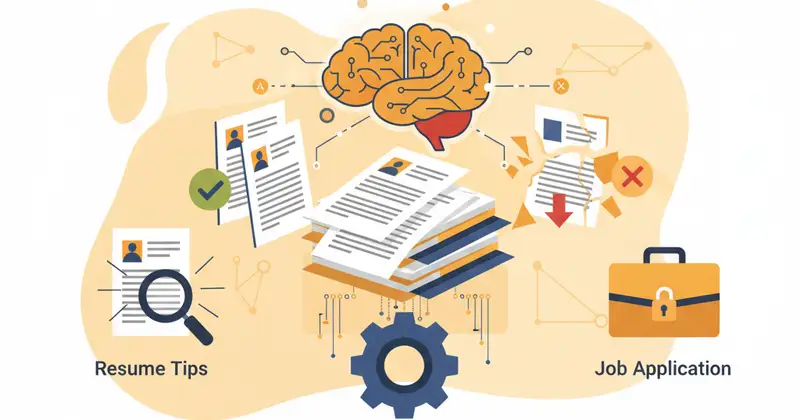
In India's highly competitive job market, where thousands apply for single openings, AI resume screening has become the critical first hurdle for most corporate and government positions. The sheer volume of applications makes manual screening impossible, prompting Artificial Intelligence (AI) to automate the initial review process. Understanding how these sophisticated Applicant Tracking Systems (ATS) operate is no longer just an advantage—it's essential for getting past digital gatekeepers and ensuring your application receives a fair chance. TrueJobs is committed to empowering you with this knowledge, equipping you to navigate today's technology-driven recruitment landscape. Mastering AI-friendly resume creation is paramount for any serious Indian job seeker, directly impacting your visibility to potential employers.

How AI Screening Works
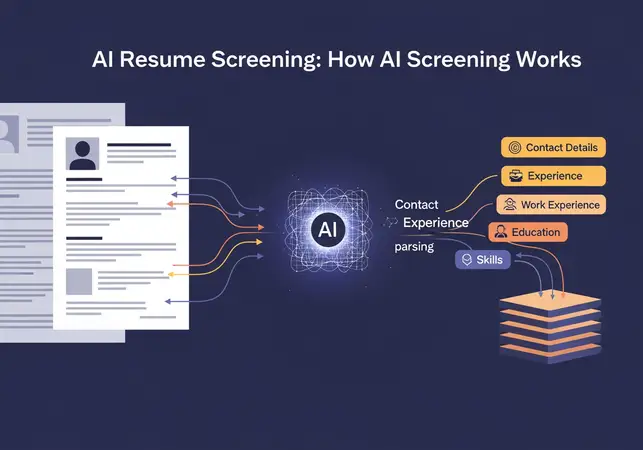
AI systems, primarily Applicant Tracking Systems (ATS), streamline recruitment by automating initial resume screening. Acting as digital gatekeepers, they analyze, sort, and rank applications based on predefined criteria and learned patterns. Here's how they function:
-
Parsing and Structuring Data: ATS "parses" your resume, converting unstructured text into structured data points like contact details, experience, education, skills, and dates. This transforms your resume into a standardized, searchable database entry, crucial for systematic analysis. Complex layouts can hinder parsing, leading to missed vital information.
-
Keyword Extraction and Matching: This is critical for initial screening. ATS identifies keywords in your resume and matches them against the job description. These include technical skills, industry-specific terminology, job titles, qualifications, certifications, and even soft skills explicitly mentioned in the job advertisement. The more closely your resume's keywords align with the job description, the higher your chances of being shortlisted.
Optimizing for Parsing Accuracy
The first step in an ATS's evaluation is its ability to accurately read and categorize the information on your resume. This process is called parsing. Think of it as the system's attempt to understand your resume's content, much like you would read it, but in a highly structured, machine-readable format. If an ATS cannot parse your resume correctly, critical information—such as your years of experience, specific skills, or educational qualifications—might be overlooked or misinterpreted. This can lead to your application being incorrectly filtered out, regardless of how qualified you are.
To ensure optimal parsing, avoid overly complex designs. While visually appealing graphics, custom fonts, or text presented within tables or text boxes might look good to the human eye, they often confuse ATS. These systems are designed to extract plain text from standard sections. Using a clean, simple, and chronological format with standard headings (e.g., "Work Experience," "Education," "Skills") significantly improves parsing accuracy. Stick to common fonts like Arial, Calibri, or Times New Roman, and avoid embedding crucial information within images.
The Nuance of Keyword Extraction and Matching
After parsing, the ATS moves on to the core task of keyword extraction. It scans your resume for specific words and phrases that are relevant to the job opening. These keywords are typically derived directly from the job description provided by the employer. The system then compares these extracted keywords against a predefined list of essential and desirable terms. This comparison is more than just a simple count; modern ATS use algorithms to assess the relevance, frequency, and context of these keywords.
For example, if a job description for a "Senior Software Engineer" lists "Java," "Python," "AWS," "Microservices," and "Agile methodologies," the ATS will look for these exact terms in your resume. It might also look for synonyms or related terms, depending on the sophistication of the system. The percentage of keyword match often determines your resume's initial ranking. A higher match percentage means a higher score, increasing the likelihood of your resume being passed on to a human recruiter.
Types of Keywords to Focus On
- Hard Skills: Specific, teachable abilities such as programming languages (Python, Java), software proficiency (SAP, AutoCAD), data analysis tools (SQL, R), or technical certifications (PMP, CCNA).
- Soft Skills: Personal attributes that enable effective interaction, often listed in job descriptions (e.g., "communication," "teamwork," "problem-solving," "leadership," "adaptability").
- Industry-Specific Jargon: Terms unique to a particular sector (e.g., "pharmacovigilance" in pharma, "public sector undertakings" in government jobs, "Bancassurance" in banking).
- Action Verbs: Strong verbs that describe your accomplishments and responsibilities (e.g., "Developed," "Managed," "Implemented," "Analyzed," "Optimized").
- Job Titles and Qualifications: Exact or very similar job titles (e.g., "Assistant Manager," "Junior Engineer") and educational qualifications (e.g., "B.Tech," "MBA," "UGC NET").
Beyond Keywords: Advanced AI Analysis
While keywords are fundamental, modern ATS are evolving beyond simple string matching. Many now incorporate Natural Language Processing (NLP) and machine learning algorithms to understand context, identify patterns, and even infer skills that aren't explicitly stated. This means they can:
- Understand Context: An advanced ATS can differentiate between "managed a team of 10" and "managed to finish on time," understanding the different implications of the word "managed." It can also understand the relationship between different skills and experiences, building a more holistic profile of the candidate.
- Identify Skill Clusters: Instead of just looking for individual keywords, AI can recognize groups of related skills that indicate proficiency in a broader area. For instance, mentioning "Python," "Pandas," "NumPy," and "Scikit-learn" together would signal strong data science capabilities.
- Analyze Work History and Progression: AI can evaluate career trajectory, looking for logical progression, duration in roles, and increasing responsibilities. Inconsistencies or frequent job changes might be flagged, while steady growth is positively weighted.
- Detect Red Flags: While not always explicit, AI can be trained to identify potential red flags such as significant unexplained gaps in employment, excessive use of passive voice, or inconsistencies in dates.
The Role of Machine Learning (ML) in ATS
Machine Learning is the engine that powers the "intelligence" in AI resume screening. ML algorithms are trained on vast datasets of past successful and unsuccessful applications, learning to identify the characteristics that correlate with good hires. This allows the ATS to:
- Learn from Past Data: Over time, an ATS can learn which resume attributes (combinations of skills, experience, education, etc.) led to successful hires within a specific company or for a particular role. It then uses this learning to score new applicants.
- Predict Candidate Success: Based on historical data, ML models can assign a predictive score to each candidate, indicating their likelihood of success in the role or organization. This goes beyond simple keyword matching to a more nuanced assessment.
- Automate Ranking and Prioritization: Instead of just filtering out unqualified candidates, ML-powered ATS can rank all applicants from most to least suitable, allowing recruiters to focus their attention on the top-tier candidates first.
Understanding Bias in AI Screening
It's crucial for job seekers to be aware that AI, despite its analytical power, is not immune to bias. Since ML algorithms learn from historical data, they can inadvertently perpetuate and amplify existing human biases present in that data. If past hiring decisions for a role favored a particular demographic, the AI might learn to prioritize candidates with similar profiles, even if those characteristics are not directly related to job performance. While efforts are being made to develop "fair AI" and mitigate bias, it remains a concern. As a job seeker, your best defense is to focus on objective, quantifiable achievements and skills directly relevant to the job, ensuring your resume is a clear and unbiased representation of your capabilities.
Common ATS Pitfalls to Avoid
Navigating the AI screening process requires more than just a good resume; it demands an ATS-aware approach. Many excellent candidates are overlooked not because they lack qualifications, but because their resumes trip up the automated systems. Here are some common pitfalls to actively avoid:
-
Generic Resumes: Submitting the same resume for every job application is a surefire way to fail ATS screening. Each job description has unique keywords and requirements. A generic resume will likely lack the specific terms the ATS is programmed to find, resulting in a low match score.
-
Overly Creative or Complex Formatting: While a visually striking resume might catch a human eye, intricate designs, graphics, tables used for text, non-standard fonts, or text boxes often confuse ATS. These systems struggle to parse information from non-standard layouts, potentially missing critical details like contact information or key skills.
-
Keyword Stuffing: Attempting to trick the ATS by excessively repeating keywords or hiding them in white text is counterproductive. Modern ATS are sophisticated enough to detect such tactics, which can lead to your application being flagged as spam or simply discarded. Focus on natural integration.
-
Ignoring the Job Description: The job description is your cheat sheet. Failing to meticulously analyze it for keywords, required skills, and experience levels means you're not speaking the ATS's language. Every word in the job description is a potential keyword.
-
Using Images for Text: Embedding your contact information, company logos, or even your entire resume as an image will make it completely invisible to an ATS. The system cannot "read" text within an image.
-
Typos and Grammatical Errors: While an ATS might not directly penalize for a typo, consistent errors can impact keyword matching (e.g., "managemnt" instead of "management"). More importantly, if your resume does pass the ATS, these errors will immediately create a negative impression on the human recruiter.
-
Uncommon Acronyms or Abbreviations: If the job description uses "Project Management Professional (PMP)," use that exact phrase and the acronym. If you only use "PMP" and the ATS is looking for the full name, it might miss it. Always mirror the job description's terminology.
Crafting an ATS-Friendly Resume: A Step-by-Step Guide
To successfully navigate the AI screening process, your resume needs to be strategically designed for both machines and humans. Here’s how to create a powerful, ATS-friendly document:
Mastering Keyword Optimization
The cornerstone of an ATS-friendly resume is effective keyword optimization. This isn't about stuffing; it's about intelligent integration.
-
Analyze the Job Description (JD): Read the JD multiple times. Highlight or list all skills, qualifications, tools, certifications, and responsibilities mentioned. Pay attention to both hard and soft skills. Look for exact phrases used.
-
Identify Core Keywords: Distinguish between essential (must-have) and desirable (good-to-have) keywords. Prioritize the essential ones.
-
Integrate Naturally: Weave these keywords throughout your resume, particularly in your professional summary/objective, work experience descriptions, and skills section. Use them in context, describing how you applied them and the results you achieved.
-
Use Varied Placement: Don't just list keywords. Show them in action. For example, instead of just "Proficient in Python," write "Developed automated data analysis scripts using Python, resulting in a 15% reduction in processing time."
-
Consider Synonyms: While exact matches are best, some ATS can recognize common synonyms. If the JD says "client relations," you might also use "customer service" if relevant, but always prioritize the JD's exact phrasing.
Structuring for Clarity and Scanability
A clean, logical structure is paramount for ATS parsing and human readability.
-
Standard Headings: Use conventional headings like "Contact Information," "Professional Summary" (or "Objective"), "Work Experience," "Education," "Skills," "Projects," "Certifications," and "Awards." Avoid creative or ambiguous titles.
-
Reverse-Chronological Order: List your work experience and education from most recent to oldest. This is the standard format preferred by both ATS and recruiters.
-
Simple Layout: Opt for a clean, single-column or two-column layout (if the two-column is very basic and text-based). Avoid intricate designs, excessive borders, shading, or custom graphics.
-
Consistent Formatting: Use consistent font sizes (e.g., 11-12pt for body, 14-16pt for headings), bullet points for responsibilities and achievements, and standard fonts (Arial, Calibri, Times New Roman, Georgia, Lato). Avoid fancy or decorative fonts.
-
White Space: Ensure adequate white space to make your resume easy on the eyes. Overly dense text blocks are difficult to read for humans and can sometimes confuse parsers.
Choosing the Right File Format
The file format can make or break your ATS compatibility.
-
DOCX is Generally Preferred: For most ATS, a .docx file (Microsoft Word document) is the safest bet. It's easily parsable and retains formatting well across different systems.
-
PDF with Caution: While PDFs preserve visual integrity, some older or less sophisticated ATS might struggle to extract text accurately from them, especially if the PDF was created from a non-text source (like a scanned image). If you use PDF, ensure it's a text-searchable PDF (created directly from a word processor, not scanned). Always check the job application instructions; if they specify PDF, use it. If not, DOCX is often safer.
-
Avoid Other Formats: Never submit your resume in formats like .JPG, .PNG, .PPT, or .Pages, as these are almost always unreadable by ATS.
Highlighting Achievements with Impact
Beyond just listing duties, quantify your accomplishments to demonstrate your value.
-
Use Action Verbs: Start bullet points with strong action verbs (e.g., "Developed," "Managed," "Led," "Analyzed," "Improved," "Streamlined").
-
Quant
AI Resume Screening: Essential Guide for Job Seekers
Learn more: Resume Writing Tips | ATS Optimization Guide | Government Job Applications
FAQs
What is AI screening?Automated resume analysisHow to optimize?Use keywordsRelated Resources
- Sarkari Naukri Resume Guide
- Latest Government Jobs
- Government Job Interview Tips
Related Government Job Resources
Continue with active job hubs and related government job pages on TrueJobs.
Tools for this recruitment topic
Use only the tools relevant to the dates, eligibility or documents discussed above.
TrueJobs Editorial Team
TrueJobs editorial desk
This article is prepared from the sources referenced in the guide and reviewed for clarity, links and dated information. Read our editorial and corrections policy.
Continue This Topic
Follow the closest earlier and newer coverage so older archive posts keep real contextual crawl paths.
SEO Blog Article — TrueJobs.co.in
Sarkari exam ka vishal syllabus dekh kar pareshan hain? Jaanein toppers ki smart strategy jisse aap high-weightage topics prioritise karke kam samay mein exam clear kar sakte hain.
Agniveer Recruitment — Complete Guide 2026
Agniveer Recruitment — Complete Guide 2026 Embarking on a career in the Indian Armed Forces is a dream for countless young Indians. It's a path that...
Read Next

ChatGPT for Job Seekers: 10 Ways to Use AI in Your Job Search

Future of Work in India: AI, Automation, and New Careers

How AI Is Changing the Hiring Process in India
UPSC Civil Services Exam 2026: Prelims Result, Mains Admit Card, and Final Updates
Explore Topics
Perfect Your Resume
Use our AI-powered Resume Builder to create ATS-optimized resumes.
AI Resume Builder