
Recruitment guide
Update Aadhaar Photo for Govt Exams 2026 Guide — Explained
Essential guide for government exam aspirants on updating Aadhaar photo with step-by-step instructions, timelines, and troubleshooting tips.
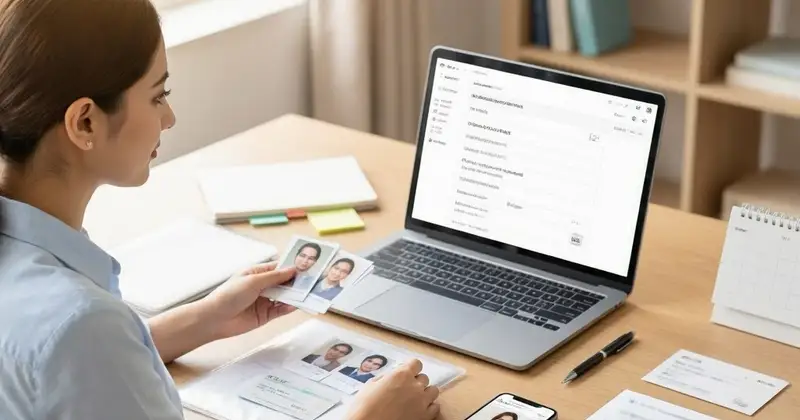
An updated Aadhaar card photo is crucial for government exam verification. This guide provides a clear process for both online and offline updates. Ensure your application is not rejected due to a mismatched photo.
Are you preparing for government exams in 2026 and worried about your Aadhaar photo not matching your current appearance? Many candidates face this issue when applying for various government positions, as Aadhaar has become a mandatory document for verification. This comprehensive guide will walk you through the entire process of updating your Aadhaar photo, helping you avoid any last-minute complications in your exam preparation journey. We'll cover everything from online and offline methods to timelines and troubleshooting tips to ensure your Aadhaar is perfectly aligned with your current appearance for seamless exam verification.
Understanding the Importance of Updated Aadhaar Photo for Government Exams
Aadhaar has become the cornerstone of identity verification in India, especially for government examinations and recruitments. The Unique Identification Authority of India (UIDAI) uses Aadhaar for biometric verification during exam processes, making it crucial that your photo accurately represents your current appearance. Many government exams, including UPSC, SSC, banking examinations, and state-level recruitments, require candidates to carry their original Aadhaar card for verification. An outdated photo can lead to rejection at the verification stage, jeopardizing your entire exam preparation efforts.
Beyond exam verification, an updated Aadhaar photo ensures smoother processing of applications, faster background checks, and eliminates potential mismatches during document verification. The photo on your Aadhaar should be clear, recent, and match your current appearance to avoid any complications. Government agencies have become increasingly strict about photo verification, especially after recent updates to security protocols. Therefore, updating your Aadhaar photo well in advance of your exam date is not just recommended but essential for a hassle-free examination experience.
Moreover, many government schemes and benefits are now linked to Aadhaar verification. An outdated photo might not only affect your exam eligibility but could also impact your access to various government services. This makes the photo update process a critical step for any serious government exam aspirant in 2026.
Eligibility Criteria for Aadhaar Photo Update
Before proceeding with the photo update process, it's important to understand who is eligible for this service. The UIDAI allows any Aadhaar holder to update their photograph free of cost, regardless of the reason for the update. This includes candidates preparing for government exams who may have changed their appearance significantly since their last photo was taken.
To be eligible for Aadhaar photo update, you must possess a valid Aadhaar number and either an original Aadhaar enrollment slip or a printed Aadhaar letter. The process is available to all Aadhaar holders, including minors. However, if you're a minor (below 18 years), your photo update must be done by your parent or guardian, and you'll need to carry additional documents including the parent's Aadhaar card.
It's worth noting that the photo update service is available both online and offline, and you can choose the method that best suits your convenience and requirements. There's no restriction on the number of times you can update your photo, though it's advisable to wait at least 30 days between updates to ensure proper processing of your previous request.
Step-by-Step Process for Online Aadhaar Photo Update
The online method for updating your Aadhaar photo offers convenience and can be completed from the comfort of your home. Follow these detailed steps for a successful online update:
- Visit the Official UIDAI Website: Navigate to the official UIDAI website (uidai.gov.in) using your preferred web browser. Ensure you're on the official site to avoid any fraudulent activities.
- Navigate to Aadhaar Services: On the homepage, locate and click on the 'Aadhaar Services' tab, usually found in the main menu or as a prominent button on the homepage.
- Select 'Update Your Address' or 'Aadhaar Update': From the dropdown menu, select the option for updating your Aadhaar details. While the menu might say 'Update Your Address,' this option leads to the complete update section including photo updates.
- Enter Aadhaar Number: Input your 12-digit Aadhaar number in the provided field. You'll also need to enter the captcha code displayed on the screen for security purposes.
- Verify OTP: An OTP (One-Time Password) will be sent to your registered mobile number. Enter this OTP to proceed with the update process.
- Upload Recent Photograph: Select a clear, recent photograph of yourself meeting the UIDAI specifications. The photo should be in JPEG or PNG format, with minimum dimensions of 200x200 pixels and maximum of 500x500 pixels.
- Preview and Confirm: Review the uploaded photograph to ensure it meets all requirements. Confirm the details and submit the update request.
- Upload Supporting Document: You may need to upload a supporting document that proves your identity, such as a PAN card, passport, or voter ID.
- Pay the Fee: While photo updates are free of cost, you might need to pay a nominal fee for other services or document uploads.
- Download Acknowledgment Slip: After successful submission, download the acknowledgment slip with the 14-digit update request number. This is crucial for tracking your update status.
The online process typically takes 7-10 working days for completion. You can track the status of your update using the 14-digit reference number on the UIDAI website.
Step-by-Step Process for Offline Aadhaar Photo Update
If you prefer face-to-face interaction or if online updates aren't working for you, the offline method is an excellent alternative. Here's how to update your Aadhaar photo through the offline process:
- Locate Nearest Aadhaar Enrollment Center: Find the nearest Aadhaar Enrollment Center or Common Service Center (CSC) using the UIDAI website or mobile app.
- Carry Required Documents: Bring your original Aadhaar card, a recent passport-sized photograph, and any supporting identity documents like PAN card, voter ID, or passport.
- Fill Out the Update Form: At the center, you'll need to fill out the Aadhaar update form. The staff will assist you if needed.
- Submit Biometrics: Provide your biometrics (fingerprints and iris scan) for verification purposes.
- Pay the Fee: The fee for offline photo update is typically Rs. 100, which may vary slightly by center.
- Receive Updated Aadhaar: You'll receive an acknowledgment slip with the update request number. The updated Aadhaar card with the new photograph will be delivered to your registered address within 30-45 days.
The offline method is particularly useful if you're not comfortable with online processes or if you want immediate confirmation of your update request. The staff at enrollment centers can guide you through the process and ensure all requirements are met.
Documents Required for Aadhaar Photo Update
Proper documentation is crucial for a successful Aadhaar photo update. While the process is straightforward, having the right documents ready will save you time and prevent delays. Here's a comprehensive list of documents you'll need:
- Original Aadhaar Card: You must carry your original Aadhaar card or the Aadhaar enrollment slip/letter. This serves as the primary proof of identity.
- Recent Photograph: A passport-sized photograph that clearly shows your face without any obstructions. The photo should be recent and match your current appearance.
- Supporting Identity Proof: Any one of the following documents can serve as supporting proof:
- PAN Card
- Voter ID Card
- Passport
- Driving License
- Bank Statement with photograph
- Ration Card
- Address Proof (if applicable): If your address has changed, carry any of the following documents:
- Bank Statement
- Utility Bill
- Ration Card
- Rent Agreement
- Property Tax Receipt
For minors, additional documents are required including the parent's Aadhaar card and a birth certificate. Ensure all documents are original and not photocopies, as the verification process requires physical verification of documents.
Timeline and Processing Time for Aadhaar Photo Update
Understanding the timeline for Aadhaar photo updates is crucial for exam preparation planning. The processing time varies depending on the method you choose and the current workload at enrollment centers.
Online Updates: When updating online, the acknowledgment is typically generated immediately after submission. The actual update process takes 7-10 working days. You can track the status using the 14-digit reference number provided in the acknowledgment slip.
Offline Updates: For offline updates at enrollment centers, you'll receive an acknowledgment slip immediately. The updated Aadhaar card is usually dispatched within 15-20 days and delivered to your registered address within 30-45 days. Some centers offer faster processing for an additional fee.
Expedited Processing: In cases where you have an urgent exam deadline, some enrollment centers offer expedited processing for an additional fee. This can reduce the processing time to 7-10 days. However, this service is not guaranteed and depends on center availability.
Peak Season Delays: During exam seasons (roughly February-May and September-December), processing times may extend due to increased demand. If you're preparing for government exams in 2026, it's advisable to start the update process at least 2-3 months before your exam date to account for any potential delays.
Common Issues and Troubleshooting
While the Aadhaar photo update process is generally smooth, some common issues may arise. Here are troubleshooting tips to help you navigate potential problems:
Photo Rejection: If your photograph is rejected during upload or verification, ensure it meets UIDAI specifications: clear, front-facing, with both eyes visible, no shadows, and proper lighting. Avoid wearing sunglasses, hats, or other headgear unless for religious purposes.
OTP Not Received: If you don't receive the OTP within 3 minutes, check if your mobile number is correctly registered with Aadhaar. You can verify this through the mAadhaar app or by visiting the nearest enrollment center.
Update Status Pending: If your update status remains pending beyond the expected timeframe, use the 14-digit reference number to check the status online. If the status is stuck, visit the nearest enrollment center with your acknowledgment slip.
Name Mismatch: If there's a mismatch between your name on Aadhaar and other documents, you'll need to update your name first before proceeding with the photo update. This additional process can take 7-10 days.
Biometric Issues: For elderly candidates or those with worn fingerprints, the biometric verification may fail. In such cases, visit an enrollment center where alternative verification methods can be used.
Frequently Asked Questions
Q: Is it mandatory to update my Aadhaar photo for government exams?
A: While not always mandatory, it's highly recommended. Many government exams require Aadhaar verification, and an outdated photo might lead to rejection during the verification stage. It's better to update your photo well in advance to avoid any complications.
Q: How many times can I update my Aadhaar photo?
A: You can update your Aadhaar photo multiple times. There's no limit on the number of updates. However, it's advisable to wait at least 30 days between updates to ensure proper processing of your previous request.
Q: Is there any fee for updating Aadhaar photo?
A: No, updating your Aadhaar photo is completely free of cost. However, if you're updating through an enrollment center, there might be a nominal fee for the service provided, typically around Rs. 100.
Q: How long does it take to receive the updated Aadhaar card?
A: Online updates typically take 7-10 working days for processing. The physical updated Aadhaar card is usually delivered to your registered address within 30-45 days. Offline updates may take slightly longer depending on the center's workload.
Q: Can I update my Aadhaar photo if I don't have supporting documents?
A: No, supporting documents are mandatory for the photo update process. You must provide at least one valid identity proof along with your Aadhaar card. If you don't have any supporting documents, you'll need to first obtain one before proceeding with the update.
Checks to complete before you apply
Updating your Aadhaar photo is a crucial step for any government exam aspirant in 2026. With the comprehensive processes available both online and offline, there's no reason to delay this important task. Remember to start the update process well in advance of your exam date, ideally 2-3 months before, to account for any potential delays. Ensure your photograph meets all specifications and carry all necessary documents to avoid complications. By following this guide and planning ahead, you can ensure your Aadhaar verification process goes smoothly, allowing you to focus on your exam preparation without any last-minute hassles. Stay updated with the latest guidelines from UIDAI and don't hesitate to visit enrollment centers if you encounter any issues during the process.
Related Resources
Related Government Job Resources
Continue with active job hubs and related government job pages on TrueJobs.
Tools for this recruitment topic
Use only the tools relevant to the dates, eligibility or documents discussed above.
TrueJobs Editorial Team
TrueJobs editorial desk
This article is prepared from the sources referenced in the guide and reviewed for clarity, links and dated information. Read our editorial and corrections policy.
Continue This Topic
Follow the closest earlier and newer coverage so older archive posts keep real contextual crawl paths.
How to Update Aadhaar Date of Birth 2026: What Proof Works for Exam Eligibility
Learn how to update your Aadhaar date of birth with valid documents, understand the process, and ensure eligibility for government exams in 2026.
APPSC Group 1 2026 Result: Everything You Need to Know
Everything you need to know about APPSC Group 1 2026 result, including download process, cutoff marks, and next steps for candidates.
Read Next

How to Update Aadhaar Date of Birth 2026: What Proof Works for Exam Eligibility

Maharashtra Board Passing Marks & Grace Marks Policy 2026
UPSC CSE 2026: Age Limit, Attempt Limit & Category Wise Rules
CTET Feb 2026 OMR Sheet and Calculation Sheet: How to Download & Verify Marks
Explore Topics
Perfect Your Resume
Use our AI-powered Resume Builder to create ATS-optimized resumes.
AI Resume Builder