
Recruitment guide
SSC Live Photo Capture 2026: Red Box & Face Position — Explained
Master SSC live photo capture for 2026 with detailed red box rules, proper face positioning, and solutions for common photo rejection problems at exam centres.
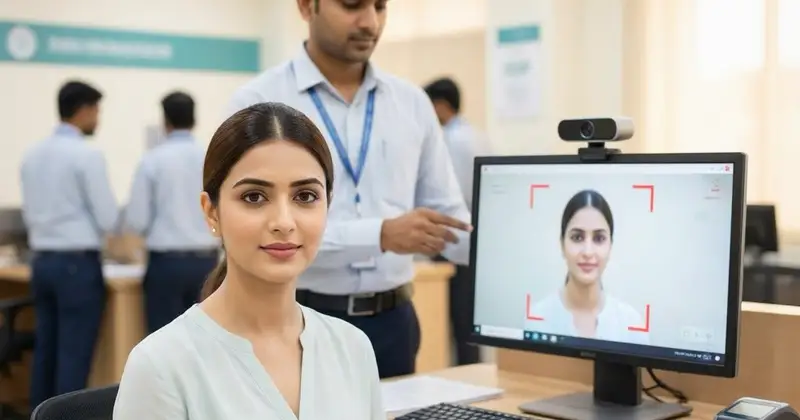
The Staff Selection Commission (SSC) has increasingly adopted live photo capture technology for its examinations to enhance the authenticity of candidate identification and reduce malpractices. As SSC gears up for its 2026 recruitment cycle, candidates must familiarize themselves with the live photo capture process, especially the specific rules regarding the red box, face positioning, and common reasons for photo rejections. This comprehensive guide will help aspirants understand the nuances of SSC live photo capture, how to comply with the red box guidelines, maintain proper face positioning, and troubleshoot common issues to avoid rejection during the exam day.
What is SSC Live Photo Capture?
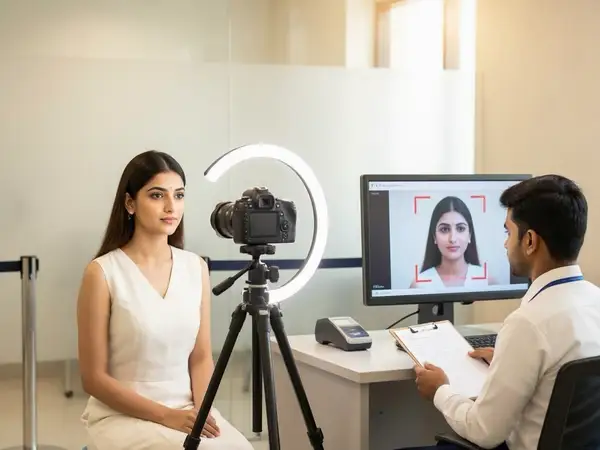
Live photo capture is a biometric verification process implemented by SSC to capture the candidate’s photograph in real-time at the examination centre. Unlike uploading pre-captured photos during application submission, this method ensures that the candidate appearing for the exam is the same individual who applied, thereby preventing impersonation and fraudulent practices.
The photograph is taken using a webcam or a dedicated camera device at the exam centre, and it is instantly verified against the candidate's application photo and identity documents.
Understanding the Red Box Rules in SSC Live Photo Capture
One of the most critical aspects of the live photo capture process is the “Red Box” guideline. The red box is a visual frame that appears on the candidate’s screen during the photo capture. It serves as a guide to position the candidate’s face correctly for the camera.
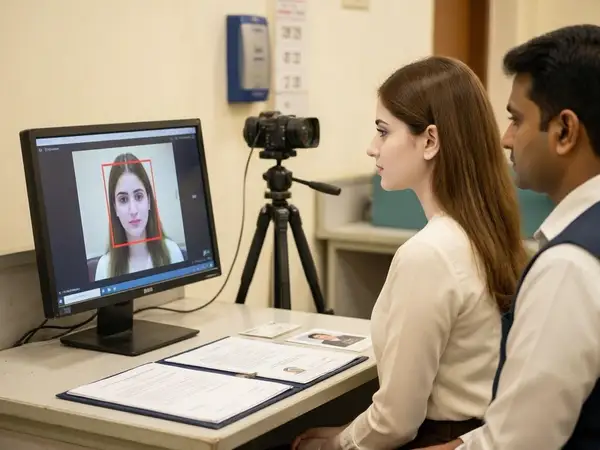
Here are the essential rules related to the red box:
- Face Alignment: The candidate’s face must be entirely inside the red box. The box usually covers the head, forehead, eyes, nose, mouth, and chin.
- Centering: The face should be centered horizontally and vertically within the red box to ensure the camera captures a balanced photograph.
- Distance: The candidate should maintain an appropriate distance — not too close or too far — so the face fits perfectly inside the red box.
- Lighting: Adequate lighting must be maintained to avoid shadows or glare that can distort facial features within the red box.
- Background: The background should be plain and free from distractions, ensuring the candidate’s face is the primary focus within the red box.
Failure to comply with these red box rules can lead to immediate rejection of the photo capture attempt, requiring the candidate to retake the photo until the criteria are met.
Proper Face Positioning Guidelines for SSC Live Photo Capture
Correct face positioning is vital to ensure the captured photo is clear, identifiable, and accepted by the SSC system. Below are detailed guidelines to help candidates position their face correctly:
- Look Straight at the Camera: Avoid tilting your head or looking away. The camera should capture a full-frontal image.
- Keep a Neutral Expression: Maintain a natural, neutral facial expression with your eyes open and mouth closed. Smiling or frowning can affect photo quality.
- Remove Accessories: Take off any hats, caps, sunglasses, or face coverings unless they are for religious purposes. Ensure the face is unobstructed.
- Hair Positioning: Keep hair away from the forehead and eyes to avoid shadows and ensure clear visibility of facial features.
- Maintain Stillness: Avoid movement during the photo capture to prevent blurring.
- Proper Lighting: Ensure your face is well-lit from the front. Avoid backlighting or harsh shadows.
Adhering to these positioning rules will help avoid photo rejection and delays during the exam process.
Common Reasons for SSC Live Photo Rejections and How to Fix Them
Despite following guidelines, candidates sometimes face photo rejections during live capture. Understanding common rejection causes and their fixes can save time and stress on exam day.
1. Face Not Fully Inside the Red Box
Issue: The face is partially outside the red box, or the candidate is too close/far from the camera.
Fix: Adjust your seating position or camera angle to ensure your entire face fits comfortably within the red box. Use the on-screen grid as a reference.
2. Poor Lighting or Shadows
Issue: Insufficient or uneven lighting causes dark areas or glare on the face.
Fix: Position yourself facing a light source, such as a window or lamp. Avoid overhead or backlighting. If indoors, ensure the room is well-lit.
3. Obstructed Face
Issue: Glasses with glare, hair covering the eyes, masks, or accessories blocking facial features.
Fix: Remove glasses if possible or adjust angle to reduce glare. Push hair back and remove face coverings unless exempted for religious reasons.
4. Blurry or Out-of-Focus Image
Issue: Movement during capture or camera focus issues.
Fix: Stay still and wait for the camera to focus. If the problem persists, request technical assistance at the exam centre.
5. Incorrect Facial Expression
Issue: Smiling, frowning, or eyes closed during capture.
Fix: Maintain a neutral expression with eyes open and mouth closed. Practice beforehand if anxious.
6. Background Distractions
Issue: Busy or cluttered background affects photo clarity.
Fix: Sit against a plain wall or use a neutral backdrop if available.
Steps to Prepare for SSC Live Photo Capture on Exam Day
Preparation is key to a smooth live photo capture experience. Follow these steps before and on the day of the exam:
- Practice at Home: Use your webcam or smartphone to practice positioning your face inside a virtual frame. This will help you get comfortable with the red box concept.
- Dress Appropriately: Wear simple, formal attire. Avoid accessories that may obstruct your face.
- Arrive Early: Reach the exam centre well in advance to avoid rushing during the photo capture process.
- Follow Instructions: Listen carefully to the invigilators and follow their directions regarding seating and camera use.
- Maintain Calmness: Stay relaxed and composed to ensure a steady posture and clear photo.
- Check Your Documents: Carry valid ID proofs and admit cards as they may be cross-verified with the live photo.
Technical Aspects and Equipment Used in SSC Live Photo Capture
The SSC live photo capture system uses advanced biometric software integrated with camera hardware to capture and verify candidate images instantly. Here’s a brief overview of the technical setup:
- Camera Type: High-resolution webcams or dedicated biometric cameras are used to ensure clear image capture.
- Software: Facial recognition software compares the live photo with the application photo and identity documents.
- Real-Time Feedback: The red box and on-screen prompts guide the candidate to adjust face position and expression.
- Data Security: Captured images are encrypted and securely transmitted to SSC servers for verification.
- Backup Systems: Centres are equipped with backup devices to handle technical glitches.
Understanding these technical factors can help candidates appreciate the importance of compliance and cooperation during the photo capture process.
How to Handle Photo Rejection at SSC Exam Centres
If your live photo capture is rejected during the exam, do not panic. Follow these steps to resolve the issue promptly:
- Listen to the Invigilator: They will inform you about the reason for rejection and guide you on retaking the photo.
- Adjust Your Position: Follow the red box rules carefully and reposition yourself as advised.
- Check Lighting and Background: Make necessary changes to lighting or background if possible.
- Remove Obstructions: Take off accessories or adjust hair as needed.
- Request Technical Support: If the problem persists, ask for technical assistance or a supervisor.
- Stay Patient: Multiple retakes may be necessary, so remain calm and cooperative.
Remember, the photo capture is mandatory for exam entry, so compliance is essential.
Future Trends: SSC and Biometric Verification
SSC’s adoption of live photo capture is part of a broader move towards biometric verification in government exams. Future enhancements may include:
- Fingerprint and Iris Scanning: Additional biometric data could be captured alongside photos for higher security.
- AI-Based Verification: Artificial intelligence may improve accuracy and speed of candidate identification.
- Remote Proctoring: Live photo capture could be integrated with remote exam monitoring for online tests.
- Mobile App Integration: Candidates might be able to verify their identity via mobile apps before reaching exam centres.
Staying updated on these trends will help candidates prepare better for future SSC exams.
Checks to complete before you apply
The SSC live photo capture process is a crucial step in ensuring fair and transparent recruitment exams. Understanding the red box rules, proper face positioning, and how to fix common photo rejections can significantly improve your exam day experience. Preparation, patience, and compliance with guidelines will help you pass the biometric verification smoothly. Keep practicing and stay informed about SSC’s latest instructions to avoid last-minute hassles. For more updates on SSC exams and government job notifications, visit TrueJobs regularly.
Frequently Asked Questions
Q1: What should I do if my live photo is rejected multiple times?
If your photo is rejected repeatedly, remain calm and carefully follow the invigilator’s instructions. Check your face position, lighting, and expression. If problems persist, request technical assistance or a supervisor’s help.
Q2: Can I wear spectacles during the live photo capture?
Wearing spectacles is generally discouraged due to glare and reflections. If you must wear them, ensure there is no glare and your eyes are clearly visible. Avoid tinted or sunglasses.
Q3: Is the live photo capture mandatory for all SSC exams?
Currently, live photo capture is mandatory for most SSC computer-based exams to verify candidate identity. Always check the specific exam instructions for confirmation.
Q4: What if I have a religious head covering?
Religious head coverings are permitted, but your face must be fully visible within the red box. Inform the invigilator if you need any special accommodation.
Q5: How can I practice for live photo capture before the exam?
You can practice using your smartphone or webcam by positioning your face inside a virtual frame, maintaining a neutral expression, and ensuring proper lighting. This will help you get comfortable with the process.
For more tips on SSC exam preparation and admit card updates, visit our /admit-card and /sarkari-result sections.
Related Resources
Related Government Job Resources
Continue with active job hubs and related government job pages on TrueJobs.
Tools for this recruitment topic
Use only the tools relevant to the dates, eligibility or documents discussed above.
TrueJobs Editorial Team
TrueJobs editorial desk
This article is prepared from the sources referenced in the guide and reviewed for clarity, links and dated information. Read our editorial and corrections policy.
Continue This Topic
Follow the closest earlier and newer coverage so older archive posts keep real contextual crawl paths.
SSC OTR Profile Locked 2026: Can You Edit Personal Details After Verification?
Wondering if you can edit your SSC OTR profile after it gets locked post-verification in 2026? Discover the rules, restrictions, and correction procedures here.
SSC OTR Aadhaar Authentication 2026: Benefits, Failures and Solutions
Explore the benefits and common issues of SSC OTR Aadhaar authentication 2026, with practical tips to resolve failures and complete your registration hassle-free.
Read Next

SSC OTR Name Already Exists 2026: Duplicate Registration, Merge Issues and Solution

SSC OTR 2026: How to Change Mobile Number, Email ID and Password Safely

SSC Application Status Not Showing 2026: Pending, Accepted, Rejected and What It Means

SSC OTR Aadhaar Authentication 2026: Benefits, Failures and Solutions
Explore Topics
Perfect Your Resume
Use our AI-powered Resume Builder to create ATS-optimized resumes.
AI Resume Builder